

添加短期记忆
短期记忆(线程级持久化)使 Agent 能够跟踪多轮对话。要添加短期记忆:from langgraph.checkpoint.memory import InMemorySaver
from langgraph.graph import StateGraph
checkpointer = InMemorySaver()
builder = StateGraph(...)
graph = builder.compile(checkpointer=checkpointer)
graph.invoke(
{"messages": [{"role": "user", "content": "您好!我是 Bob"}]},
{"configurable": {"thread_id": "1"}},
)
在生产环境中使用
在生产环境中,使用由数据库支持的检查点保存器:from langgraph.checkpoint.postgres import PostgresSaver
DB_URI = "postgresql://postgres:postgres@localhost:5442/postgres?sslmode=disable"
with PostgresSaver.from_conn_string(DB_URI) as checkpointer:
builder = StateGraph(...)
graph = builder.compile(checkpointer=checkpointer)
示例:使用 Postgres 检查点保存器
示例:使用 Postgres 检查点保存器
pip install -U "psycopg[binary,pool]" langgraph langgraph-checkpoint-postgres
首次使用 Postgres 检查点保存器时,您需要调用
checkpointer.setup()- 同步
- 异步
from langchain.chat_models import init_chat_model
from langgraph.graph import StateGraph, MessagesState, START
from langgraph.checkpoint.postgres import PostgresSaver

model = init_chat_model(model="claude-haiku-4-5-20251001")

DB_URI = "postgresql://postgres:postgres@localhost:5442/postgres?sslmode=disable"
with PostgresSaver.from_conn_string(DB_URI) as checkpointer:
    # checkpointer.setup()

    def call_model(state: MessagesState):
        response = model.invoke(state["messages"])
        return {"messages": response}

    builder = StateGraph(MessagesState)
    builder.add_node(call_model)
    builder.add_edge(START, "call_model")

    graph = builder.compile(checkpointer=checkpointer)

    config = {
        "configurable": {
            "thread_id": "1"
        }
    }

    for chunk in graph.stream(
        {"messages": [{"role": "user", "content": "您好!我是 bob"}]},
        config,
        stream_mode="values"
    ):
        chunk["messages"][-1].pretty_print()

    for chunk in graph.stream(
        {"messages": [{"role": "user", "content": "我叫什么名字?"}]},
        config,
        stream_mode="values"
    ):
        chunk["messages"][-1].pretty_print()
from langchain.chat_models import init_chat_model
from langgraph.graph import StateGraph, MessagesState, START
from langgraph.checkpoint.postgres.aio import AsyncPostgresSaver

model = init_chat_model(model="claude-haiku-4-5-20251001")

DB_URI = "postgresql://postgres:postgres@localhost:5442/postgres?sslmode=disable"
async with AsyncPostgresSaver.from_conn_string(DB_URI) as checkpointer:
    # await checkpointer.setup()

    async def call_model(state: MessagesState):
        response = await model.ainvoke(state["messages"])
        return {"messages": response}

    builder = StateGraph(MessagesState)
    builder.add_node(call_model)
    builder.add_edge(START, "call_model")

    graph = builder.compile(checkpointer=checkpointer)

    config = {
        "configurable": {
            "thread_id": "1"
        }
    }

    async for chunk in graph.astream(
        {"messages": [{"role": "user", "content": "您好!我是 bob"}]},
        config,
        stream_mode="values"
    ):
        chunk["messages"][-1].pretty_print()

    async for chunk in graph.astream(
        {"messages": [{"role": "user", "content": "我叫什么名字?"}]},
        config,
        stream_mode="values"
    ):
        chunk["messages"][-1].pretty_print()
示例:使用 MongoDB 检查点保存器
示例:使用 MongoDB 检查点保存器
pip install -U pymongo langgraph langgraph-checkpoint-mongodb
设置
要使用 MongoDB 检查点保存器,您需要一个 MongoDB 集群。如果您还没有集群,请按照此指南创建集群。
- 同步
- 异步
from langchain.chat_models import init_chat_model
from langgraph.graph import StateGraph, MessagesState, START
from langgraph.checkpoint.mongodb import MongoDBSaver

model = init_chat_model(model="claude-haiku-4-5-20251001")

DB_URI = "localhost:27017"
with MongoDBSaver.from_conn_string(DB_URI) as checkpointer:

    def call_model(state: MessagesState):
        response = model.invoke(state["messages"])
        return {"messages": response}

    builder = StateGraph(MessagesState)
    builder.add_node(call_model)
    builder.add_edge(START, "call_model")

    graph = builder.compile(checkpointer=checkpointer)

    config = {
        "configurable": {
            "thread_id": "1"
        }
    }

    for chunk in graph.stream(
        {"messages": [{"role": "user", "content": "您好!我是 bob"}]},
        config,
        stream_mode="values"
    ):
        chunk["messages"][-1].pretty_print()

    for chunk in graph.stream(
        {"messages": [{"role": "user", "content": "我叫什么名字?"}]},
        config,
        stream_mode="values"
    ):
        chunk["messages"][-1].pretty_print()
from langchain.chat_models import init_chat_model
from langgraph.graph import StateGraph, MessagesState, START
from langgraph.checkpoint.mongodb.aio import AsyncMongoDBSaver

model = init_chat_model(model="claude-haiku-4-5-20251001")

DB_URI = "localhost:27017"
async with AsyncMongoDBSaver.from_conn_string(DB_URI) as checkpointer:

    async def call_model(state: MessagesState):
        response = await model.ainvoke(state["messages"])
        return {"messages": response}

    builder = StateGraph(MessagesState)
    builder.add_node(call_model)
    builder.add_edge(START, "call_model")

    graph = builder.compile(checkpointer=checkpointer)

    config = {
        "configurable": {
            "thread_id": "1"
        }
    }

    async for chunk in graph.astream(
        {"messages": [{"role": "user", "content": "您好!我是 bob"}]},
        config,
        stream_mode="values"
    ):
        chunk["messages"][-1].pretty_print()

    async for chunk in graph.astream(
        {"messages": [{"role": "user", "content": "我叫什么名字?"}]},
        config,
        stream_mode="values"
    ):
        chunk["messages"][-1].pretty_print()
示例:使用 Redis 检查点保存器
示例:使用 Redis 检查点保存器
pip install -U langgraph langgraph-checkpoint-redis
首次使用 Redis 检查点保存器时,您需要调用
checkpointer.setup()。- 同步
- 异步
from langchain.chat_models import init_chat_model
from langgraph.graph import StateGraph, MessagesState, START
from langgraph.checkpoint.redis import RedisSaver

model = init_chat_model(model="claude-haiku-4-5-20251001")

DB_URI = "redis://localhost:6379"
with RedisSaver.from_conn_string(DB_URI) as checkpointer:
    # checkpointer.setup()

    def call_model(state: MessagesState):
        response = model.invoke(state["messages"])
        return {"messages": response}

    builder = StateGraph(MessagesState)
    builder.add_node(call_model)
    builder.add_edge(START, "call_model")

    graph = builder.compile(checkpointer=checkpointer)

    config = {
        "configurable": {
            "thread_id": "1"
        }
    }

    for chunk in graph.stream(
        {"messages": [{"role": "user", "content": "您好!我是 bob"}]},
        config,
        stream_mode="values"
    ):
        chunk["messages"][-1].pretty_print()

    for chunk in graph.stream(
        {"messages": [{"role": "user", "content": "我叫什么名字?"}]},
        config,
        stream_mode="values"
    ):
        chunk["messages"][-1].pretty_print()
from langchain.chat_models import init_chat_model
from langgraph.graph import StateGraph, MessagesState, START
from langgraph.checkpoint.redis.aio import AsyncRedisSaver

model = init_chat_model(model="claude-haiku-4-5-20251001")

DB_URI = "redis://localhost:6379"
async with AsyncRedisSaver.from_conn_string(DB_URI) as checkpointer:
    # await checkpointer.asetup()

    async def call_model(state: MessagesState):
        response = await model.ainvoke(state["messages"])
        return {"messages": response}

    builder = StateGraph(MessagesState)
    builder.add_node(call_model)
    builder.add_edge(START, "call_model")

    graph = builder.compile(checkpointer=checkpointer)

    config = {
        "configurable": {
            "thread_id": "1"
        }
    }

    async for chunk in graph.astream(
        {"messages": [{"role": "user", "content": "您好!我是 bob"}]},
        config,
        stream_mode="values"
    ):
        chunk["messages"][-1].pretty_print()

    async for chunk in graph.astream(
        {"messages": [{"role": "user", "content": "我叫什么名字?"}]},
        config,
        stream_mode="values"
    ):
        chunk["messages"][-1].pretty_print()
在子图中使用
如果您的图包含子图,您只需要在编译父图时提供检查点保存器。LangGraph 会自动将检查点保存器传播到子图。from langgraph.graph import START, StateGraph
from langgraph.checkpoint.memory import InMemorySaver
from typing import TypedDict
class State(TypedDict):
foo: str
# 子图
def subgraph_node_1(state: State):
return {"foo": state["foo"] + "bar"}
subgraph_builder = StateGraph(State)
subgraph_builder.add_node(subgraph_node_1)
subgraph_builder.add_edge(START, "subgraph_node_1")
subgraph = subgraph_builder.compile()
# 父图
builder = StateGraph(State)
builder.add_node("node_1", subgraph)
builder.add_edge(START, "node_1")
checkpointer = InMemorySaver()
graph = builder.compile(checkpointer=checkpointer)
subgraph_builder = StateGraph(...)
subgraph = subgraph_builder.compile(checkpointer=True)
添加长期记忆
使用长期记忆来跨对话存储特定于用户或特定于应用程序的数据。from langgraph.store.memory import InMemoryStore
from langgraph.graph import StateGraph
store = InMemoryStore()
builder = StateGraph(...)
graph = builder.compile(store=store)
在节点内访问存储
一旦使用存储编译图,LangGraph 会自动将存储注入到您的节点函数中。访问存储的推荐方式是通过Runtime 对象。
from dataclasses import dataclass
from langgraph.runtime import Runtime
from langgraph.graph import StateGraph, MessagesState, START
import uuid

@dataclass
class Context:
    user_id: str

async def call_model(state: MessagesState, runtime: Runtime[Context]):
    user_id = runtime.context.user_id
    namespace = (user_id, "memories")

    # 搜索相关记忆
    memories = await runtime.store.asearch(
        namespace, query=state["messages"][-1].content, limit=3
    )
    info = "\n".join([d.value["data"] for d in memories])

    # ... 在模型调用中使用记忆

    # 存储新记忆
    await runtime.store.aput(
        namespace, str(uuid.uuid4()), {"data": "用户偏好深色模式"}
    )

builder = StateGraph(MessagesState, context_schema=Context)
builder.add_node(call_model)
builder.add_edge(START, "call_model")
graph = builder.compile(store=store)

# 调用时传递上下文
graph.invoke(
    {"messages": [{"role": "user", "content": "您好"}]},
    {"configurable": {"thread_id": "1"}},
    context=Context(user_id="1"),
)
在生产环境中使用
在生产环境中,使用由数据库支持的存储:from langgraph.store.postgres import PostgresStore
DB_URI = "postgresql://postgres:postgres@localhost:5442/postgres?sslmode=disable"
with PostgresStore.from_conn_string(DB_URI) as store:
builder = StateGraph(...)
graph = builder.compile(store=store)
示例:使用 Postgres 存储
示例:使用 Postgres 存储
pip install -U "psycopg[binary,pool]" langgraph langgraph-checkpoint-postgres
首次使用 Postgres 存储时,您需要调用
store.setup()- 异步
- 同步
from dataclasses import dataclass
from langchain.chat_models import init_chat_model
from langgraph.graph import StateGraph, MessagesState, START
from langgraph.checkpoint.postgres.aio import AsyncPostgresSaver
from langgraph.store.postgres.aio import AsyncPostgresStore
from langgraph.runtime import Runtime
import uuid

model = init_chat_model(model="claude-haiku-4-5-20251001")

@dataclass
class Context:
    user_id: str

async def call_model(
    state: MessagesState,
    runtime: Runtime[Context],
):
    user_id = runtime.context.user_id
    namespace = ("memories", user_id)
    memories = await runtime.store.asearch(namespace, query=str(state["messages"][-1].content))
    info = "\n".join([d.value["data"] for d in memories])
    system_msg = f"您是一个乐于助人的助手,与用户交流。用户信息:{info}"

    # 如果用户要求模型记住,则存储新记忆
    last_message = state["messages"][-1]
    if "记住" in last_message.content.lower():
        memory = "用户名是 Bob"
        await runtime.store.aput(namespace, str(uuid.uuid4()), {"data": memory})

    response = await model.ainvoke(
        [{"role": "system", "content": system_msg}] + state["messages"]
    )
    return {"messages": response}

DB_URI = "postgresql://postgres:postgres@localhost:5442/postgres?sslmode=disable"

async with (
    AsyncPostgresStore.from_conn_string(DB_URI) as store,
    AsyncPostgresSaver.from_conn_string(DB_URI) as checkpointer,
):
    # await store.setup()
    # await checkpointer.setup()

    builder = StateGraph(MessagesState, context_schema=Context)
    builder.add_node(call_model)
    builder.add_edge(START, "call_model")

    graph = builder.compile(
        checkpointer=checkpointer,
        store=store,
    )

    config = {"configurable": {"thread_id": "1"}}
    async for chunk in graph.astream(
        {"messages": [{"role": "user", "content": "您好!请记住:我的名字是 Bob"}]},
        config,
        stream_mode="values",
        context=Context(user_id="1"),
    ):
        chunk["messages"][-1].pretty_print()

    config = {"configurable": {"thread_id": "2"}}
    async for chunk in graph.astream(
        {"messages": [{"role": "user", "content": "我叫什么名字?"}]},
        config,
        stream_mode="values",
        context=Context(user_id="1"),
    ):
        chunk["messages"][-1].pretty_print()
from dataclasses import dataclass
from langchain.chat_models import init_chat_model
from langgraph.graph import StateGraph, MessagesState, START
from langgraph.checkpoint.postgres import PostgresSaver
from langgraph.store.postgres import PostgresStore
from langgraph.runtime import Runtime
import uuid

model = init_chat_model(model="claude-haiku-4-5-20251001")

@dataclass
class Context:
    user_id: str

def call_model(
    state: MessagesState,
    runtime: Runtime[Context],
):
    user_id = runtime.context.user_id
    namespace = ("memories", user_id)
    memories = runtime.store.search(namespace, query=str(state["messages"][-1].content))
    info = "\n".join([d.value["data"] for d in memories])
    system_msg = f"您是一个乐于助人的助手,与用户交流。用户信息:{info}"

    # 如果用户要求模型记住,则存储新记忆
    last_message = state["messages"][-1]
    if "记住" in last_message.content.lower():
        memory = "用户名是 Bob"
        runtime.store.put(namespace, str(uuid.uuid4()), {"data": memory})

    response = model.invoke(
        [{"role": "system", "content": system_msg}] + state["messages"]
    )
    return {"messages": response}

DB_URI = "postgresql://postgres:postgres@localhost:5442/postgres?sslmode=disable"

with (
    PostgresStore.from_conn_string(DB_URI) as store,
    PostgresSaver.from_conn_string(DB_URI) as checkpointer,
):
    # store.setup()
    # checkpointer.setup()

    builder = StateGraph(MessagesState, context_schema=Context)
    builder.add_node(call_model)
    builder.add_edge(START, "call_model")

    graph = builder.compile(
        checkpointer=checkpointer,
        store=store,
    )

    config = {"configurable": {"thread_id": "1"}}
    for chunk in graph.stream(
        {"messages": [{"role": "user", "content": "您好!请记住:我的名字是 Bob"}]},
        config,
        stream_mode="values",
        context=Context(user_id="1"),
    ):
        chunk["messages"][-1].pretty_print()

    config = {"configurable": {"thread_id": "2"}}
    for chunk in graph.stream(
        {"messages": [{"role": "user", "content": "我叫什么名字?"}]},
        config,
        stream_mode="values",
        context=Context(user_id="1"),
    ):
        chunk["messages"][-1].pretty_print()
示例:使用 Redis 存储
示例:使用 Redis 存储
pip install -U langgraph langgraph-checkpoint-redis
首次使用 Redis 存储时,您需要调用
store.setup()。- 异步
- 同步
from dataclasses import dataclass
from langchain.chat_models import init_chat_model
from langgraph.graph import StateGraph, MessagesState, START
from langgraph.checkpoint.redis.aio import AsyncRedisSaver
from langgraph.store.redis.aio import AsyncRedisStore
from langgraph.runtime import Runtime
import uuid

model = init_chat_model(model="claude-haiku-4-5-20251001")

@dataclass
class Context:
    user_id: str

async def call_model(
    state: MessagesState,
    runtime: Runtime[Context],
):
    user_id = runtime.context.user_id
    namespace = ("memories", user_id)
    memories = await runtime.store.asearch(namespace, query=str(state["messages"][-1].content))
    info = "\n".join([d.value["data"] for d in memories])
    system_msg = f"您是一个乐于助人的助手,与用户交流。用户信息:{info}"

    # 如果用户要求模型记住,则存储新记忆
    last_message = state["messages"][-1]
    if "记住" in last_message.content.lower():
        memory = "用户名是 Bob"
        await runtime.store.aput(namespace, str(uuid.uuid4()), {"data": memory})

    response = await model.ainvoke(
        [{"role": "system", "content": system_msg}] + state["messages"]
    )
    return {"messages": response}

DB_URI = "redis://localhost:6379"

async with (
    AsyncRedisStore.from_conn_string(DB_URI) as store,
    AsyncRedisSaver.from_conn_string(DB_URI) as checkpointer,
):
    # await store.setup()
    # await checkpointer.asetup()

    builder = StateGraph(MessagesState, context_schema=Context)
    builder.add_node(call_model)
    builder.add_edge(START, "call_model")

    graph = builder.compile(
        checkpointer=checkpointer,
        store=store,
    )

    config = {"configurable": {"thread_id": "1"}}
    async for chunk in graph.astream(
        {"messages": [{"role": "user", "content": "您好!请记住:我的名字是 Bob"}]},
        config,
        stream_mode="values",
        context=Context(user_id="1"),
    ):
        chunk["messages"][-1].pretty_print()

    config = {"configurable": {"thread_id": "2"}}
    async for chunk in graph.astream(
        {"messages": [{"role": "user", "content": "我叫什么名字?"}]},
        config,
        stream_mode="values",
        context=Context(user_id="1"),
    ):
        chunk["messages"][-1].pretty_print()
from dataclasses import dataclass
from langchain.chat_models import init_chat_model
from langgraph.graph import StateGraph, MessagesState, START
from langgraph.checkpoint.redis import RedisSaver
from langgraph.store.redis import RedisStore
from langgraph.runtime import Runtime
import uuid

model = init_chat_model(model="claude-haiku-4-5-20251001")

@dataclass
class Context:
    user_id: str

def call_model(
    state: MessagesState,
    runtime: Runtime[Context],
):
    user_id = runtime.context.user_id
    namespace = ("memories", user_id)
    memories = runtime.store.search(namespace, query=str(state["messages"][-1].content))
    info = "\n".join([d.value["data"] for d in memories])
    system_msg = f"您是一个乐于助人的助手,与用户交流。用户信息:{info}"

    # 如果用户要求模型记住,则存储新记忆
    last_message = state["messages"][-1]
    if "记住" in last_message.content.lower():
        memory = "用户名是 Bob"
        runtime.store.put(namespace, str(uuid.uuid4()), {"data": memory})

    response = model.invoke(
        [{"role": "system", "content": system_msg}] + state["messages"]
    )
    return {"messages": response}

DB_URI = "redis://localhost:6379"

with (
    RedisStore.from_conn_string(DB_URI) as store,
    RedisSaver.from_conn_string(DB_URI) as checkpointer,
):
    store.setup()
    checkpointer.setup()

    builder = StateGraph(MessagesState, context_schema=Context)
    builder.add_node(call_model)
    builder.add_edge(START, "call_model")

    graph = builder.compile(
        checkpointer=checkpointer,
        store=store,
    )

    config = {"configurable": {"thread_id": "1"}}
    for chunk in graph.stream(
        {"messages": [{"role": "user", "content": "您好!请记住:我的名字是 Bob"}]},
        config,
        stream_mode="values",
        context=Context(user_id="1"),
    ):
        chunk["messages"][-1].pretty_print()

    config = {"configurable": {"thread_id": "2"}}
    for chunk in graph.stream(
        {"messages": [{"role": "user", "content": "我叫什么名字?"}]},
        config,
        stream_mode="values",
        context=Context(user_id="1"),
    ):
        chunk["messages"][-1].pretty_print()
使用语义搜索
在图的记忆存储中启用语义搜索,让图 Agent 能够通过语义相似性搜索存储中的项目。from langchain.embeddings import init_embeddings
from langgraph.store.memory import InMemoryStore
# 创建启用语义搜索的存储
embeddings = init_embeddings("openai:text-embedding-3-small")
store = InMemoryStore(
index={
"embed": embeddings,
"dims": 1536,
}
)
store.put(("user_123", "memories"), "1", {"text": "我喜欢披萨"})
store.put(("user_123", "memories"), "2", {"text": "我是一名水管工"})
items = store.search(
("user_123", "memories"), query="我饿了", limit=1
)
带有语义搜索的长期记忆
带有语义搜索的长期记忆
from langchain.embeddings import init_embeddings
from langchain.chat_models import init_chat_model
from langgraph.store.memory import InMemoryStore
from langgraph.graph import START, MessagesState, StateGraph
from langgraph.runtime import Runtime

model = init_chat_model("gpt-4.1-mini")

# 创建启用语义搜索的存储
embeddings = init_embeddings("openai:text-embedding-3-small")
store = InMemoryStore(
    index={
        "embed": embeddings,
        "dims": 1536,
    }
)

@dataclass
class Context:
    user_id: str

def call_model(
    state: MessagesState,
    runtime: Runtime[Context],
):
    user_id = runtime.context.user_id
    namespace = (user_id, "memories")
    memories = runtime.store.search(namespace, query=str(state["messages"][-1].content), limit=3)
    info = "\n".join([d.value["text"] for d in memories])
    system_msg = f"您是一个乐于助人的助手,与用户交流。用户相关信息:{info}"

    response = model.invoke(
        [{"role": "system", "content": system_msg}] + state["messages"]
    )
    return {"messages": response}

builder = StateGraph(MessagesState, context_schema=Context)
builder.add_node(call_model)
builder.add_edge(START, "call_model")
graph = builder.compile(store=store)

# 存储一些关于用户的记忆
store.put(
    ("user_1", "memories"),
    "1",
    {"text": "用户是一名软件工程师,喜欢 Python 和 JavaScript"},
)
store.put(
    ("user_1", "memories"),
    "2",
    {"text": "用户有两只猫,名叫 Luna 和 Leo"},
)

config = {"configurable": {"thread_id": "1"}}
for chunk in graph.stream(
    {"messages": [{"role": "user", "content": "告诉我关于我自己的事情"}]},
    config,
    stream_mode="values",
    context=Context(user_id="user_1"),
):
    chunk["messages"][-1].pretty_print()

config = {"configurable": {"thread_id": "2"}}
for chunk in graph.stream(
    {"messages": [{"role": "user", "content": "告诉我关于我的宠物的信息"}]},
    config,
    stream_mode="values",
    context=Context(user_id="user_1"),
):
    chunk["messages"][-1].pretty_print()
================================== AI 消息 ==================================

根据我关于您的信息,您是一名软件工程师,喜欢 Python 和 JavaScript。您有两只猫,名叫 Luna 和 Leo。
================================== AI 消息 ==================================

您有两只猫,名叫 Luna 和 Leo。
管理短期记忆
启用短期记忆后,长对话可能会超过 LLM 的上下文窗口。常见的解决方案有:- 修剪消息:删除前 N 条或后 N 条消息(在调用 LLM 之前)
- 从 LangGraph 状态中永久删除消息
- 汇总消息:汇总历史记录中的早期消息,并用摘要替换它们
- 管理检查点以存储和检索消息历史
- 自定义策略(例如,消息过滤等)
修剪消息
大多数 LLM 都有支持的最大上下文窗口(以 token 计)。决定何时截断消息的一种方法是计算消息历史中的 token 数,并在接近该限制时进行截断。如果您使用 LangChain,您可以使用修剪消息实用程序并指定要从列表中保留的 token 数,以及用于处理边界的strategy(例如,保留最后的 max_tokens)。
要修剪消息历史,请使用 trim_messages 函数:
from langchain_core.messages.utils import (
    trim_messages,
    count_tokens_approximately
)

def call_model(state: MessagesState):
    messages = trim_messages(
        state["messages"],
        strategy="last",
        token_counter=count_tokens_approximately,
        max_tokens=128,
        start_on="human",
        end_on=("human", "tool"),
    )
    response = model.invoke(messages)
    return {"messages": [response]}

builder = StateGraph(MessagesState)
builder.add_node(call_model)
...
完整示例:修剪消息
完整示例:修剪消息
from langchain_core.messages.utils import (
    trim_messages,
    count_tokens_approximately
)
from langchain.chat_models import init_chat_model
from langgraph.graph import StateGraph, START, MessagesState

model = init_chat_model("claude-sonnet-4-6")
summarization_model = model.bind(max_tokens=128)

def call_model(state: MessagesState):
    messages = trim_messages(
        state["messages"],
        strategy="last",
        token_counter=count_tokens_approximately,
        max_tokens=128,
        start_on="human",
        end_on=("human", "tool"),
    )
    response = model.invoke(messages)
    return {"messages": [response]}

checkpointer = InMemorySaver()
builder = StateGraph(MessagesState)
builder.add_node(call_model)
builder.add_edge(START, "call_model")
graph = builder.compile(checkpointer=checkpointer)

config = {"configurable": {"thread_id": "1"}}
graph.invoke({"messages": "hi, my name is bob"}, config)
graph.invoke({"messages": "write a short poem about cats"}, config)
graph.invoke({"messages": "now do the same but for dogs"}, config)
final_response = graph.invoke({"messages": "what's my name?"}, config)

final_response["messages"][-1].pretty_print()
================================== AI 消息 ==================================

Your name is Bob, as you mentioned when you first introduced yourself.
删除消息
您可以从图状态中删除消息以管理消息历史。这在您希望删除特定消息或清除整个消息历史时很有用。 要从图状态中删除消息,您可以使用RemoveMessage。为了使 RemoveMessage 工作,您需要使用带有 add_messages归约器的状态键,如 MessagesState。
要删除特定消息:
from langchain.messages import RemoveMessage

def delete_messages(state):
    messages = state["messages"]
    if len(messages) > 2:
        # 删除最早的两条消息
        return {"messages": [RemoveMessage(id=m.id) for m in messages[:2]]}
from langgraph.graph.message import REMOVE_ALL_MESSAGES

def delete_messages(state):
    return {"messages": [RemoveMessage(id=REMOVE_ALL_MESSAGES)]}
删除消息时,请确保生成的消息历史是有效的。检查您使用的 LLM 提供商的限制。例如:
- 某些提供商期望消息历史以
user消息开始 - 大多数提供商要求带有工具调用的
assistant消息后跟相应的tool结果消息。
完整示例:删除消息
完整示例:删除消息
from langchain.messages import RemoveMessage

def delete_messages(state):
    messages = state["messages"]
    if len(messages) > 2:
        # 删除最早的两条消息
        return {"messages": [RemoveMessage(id=m.id) for m in messages[:2]]}

def call_model(state: MessagesState):
    response = model.invoke(state["messages"])
    return {"messages": response}

builder = StateGraph(MessagesState)
builder.add_sequence([call_model, delete_messages])
builder.add_edge(START, "call_model")

checkpointer = InMemorySaver()
app = builder.compile(checkpointer=checkpointer)

for event in app.stream(
    {"messages": [{"role": "user", "content": "hi! I'm bob"}]},
    config,
    stream_mode="values"
):
    print([(message.type, message.content) for message in event["messages"]])

for event in app.stream(
    {"messages": [{"role": "user", "content": "what's my name?"}]},
    config,
    stream_mode="values"
):
    print([(message.type, message.content) for message in event["messages"]])
[('human', "hi! I'm bob")]
[('human', "hi! I'm bob"), ('ai', 'Hi Bob! How are you doing today? Is there anything I can help you with?')]
[('human', "hi! I'm bob"), ('ai', 'Hi Bob! How are you doing today? Is there anything I can help you with?'), ('human', "what's my name?")]
[('human', "hi! I'm bob"), ('ai', 'Hi Bob! How are you doing today? Is there anything I can help you with?'), ('human', "what's my name?"), ('ai', 'Your name is Bob.')]
[('human', "what's my name?"), ('ai', 'Your name is Bob.')]
汇总消息
如上所示,修剪或删除消息的问题在于您可能会因削减消息队列而丢失信息。因此,一些应用程序受益于使用聊天模型汇总消息历史的更复杂方法。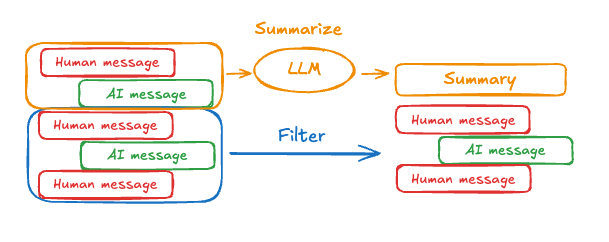 可以使用提示和编排逻辑来汇总消息历史。例如,在 LangGraph 中,您可以扩展
 MessagesState 以包含 summary 键:
from langgraph.graph import MessagesState
class State(MessagesState):
    summary: str
messages 状态键中积累了一定数量的消息后,可以调用此 summarize_conversation 节点。
def summarize_conversation(state: State):

    # 首先,我们获取任何现有的摘要
    summary = state.get("summary", "")

    # 创建我们的汇总提示
    if summary:

        # 摘要已存在
        summary_message = (
            f"This is a summary of the conversation to date: {summary}\n\n"
            "Extend the summary by taking into account the new messages above:"
        )

    else:
        summary_message = "Create a summary of the conversation above:"

    # 将提示添加到我们的历史
    messages = state["messages"] + [HumanMessage(content=summary_message)]
    response = model.invoke(messages)

    # 删除除最近两条消息之外的所有消息
    delete_messages = [RemoveMessage(id=m.id) for m in state["messages"][:-2]]
    return {"summary": response.content, "messages": delete_messages}
完整示例:汇总消息
完整示例:汇总消息
from typing import Any, TypedDict

from langchain.chat_models import init_chat_model
from langchain.messages import AnyMessage
from langchain_core.messages.utils import count_tokens_approximately
from langgraph.graph import StateGraph, START, MessagesState
from langgraph.checkpoint.memory import InMemorySaver
from langmem.short_term import SummarizationNode, RunningSummary

model = init_chat_model("claude-sonnet-4-6")
summarization_model = model.bind(max_tokens=128)

class State(MessagesState):
    context: dict[str, RunningSummary]

class LLMInputState(TypedDict):
    summarized_messages: list[AnyMessage]
    context: dict[str, RunningSummary]

summarization_node = SummarizationNode(
    token_counter=count_tokens_approximately,
    model=summarization_model,
    max_tokens=256,
    max_tokens_before_summary=256,
    max_summary_tokens=128,
)

def call_model(state: LLMInputState):
    response = model.invoke(state["summarized_messages"])
    return {"messages": [response]}

checkpointer = InMemorySaver()
builder = StateGraph(State)
builder.add_node(call_model)
builder.add_node("summarize", summarization_node)
builder.add_edge(START, "summarize")
builder.add_edge("summarize", "call_model")
graph = builder.compile(checkpointer=checkpointer)

# 调用图
config = {"configurable": {"thread_id": "1"}}
graph.invoke({"messages": "hi, my name is bob"}, config)
graph.invoke({"messages": "write a short poem about cats"}, config)
graph.invoke({"messages": "now do the same but for dogs"}, config)
final_response = graph.invoke({"messages": "what's my name?"}, config)

final_response["messages"][-1].pretty_print()
print("\nSummary:", final_response["context"]["running_summary"].summary)
- 我们将在
context字段中跟踪我们的运行摘要
SummarizationNode 所期望的)。- 定义私有状态,仅用于过滤
call_model 节点的输入。- 我们在这里传递私有输入状态来隔离汇总节点返回的消息
================================== AI 消息 ==================================

From our conversation, I can see that you introduced yourself as Bob. That's the name you shared with me when we began talking.

Summary: In this conversation, I was introduced to Bob, who then asked me to write a poem about cats. I composed a poem titled "The Mystery of Cats" that captured cats' graceful movements, independent nature, and their special relationship with humans. Bob then requested a similar poem about dogs, so I wrote "The Joy of Dogs," which highlighted dogs' loyalty, enthusiasm, and loving companionship. Both poems were written in a similar style but emphasized the distinct characteristics that make each pet special.
管理检查点
您可以查看和删除检查点保存器存储的信息。查看线程状态
- Graph/Functional API
- Checkpointer API
config = {
    "configurable": {
        "thread_id": "1",
        # 可选地为特定检查点提供 ID,
        # 否则显示最新的检查点
        # "checkpoint_id": "1f029ca3-1f5b-6704-8004-820c16b69a5a"  #

    }
}
graph.get_state(config)
StateSnapshot(
    values={'messages': [HumanMessage(content="hi! I'm bob"), AIMessage(content='Hi Bob! How are you doing today?), HumanMessage(content="what's my name?"), AIMessage(content='Your name is Bob.')]}, next=(),
    config={'configurable': {'thread_id': '1', 'checkpoint_ns': '', 'checkpoint_id': '1f029ca3-1f5b-6704-8004-820c16b69a5a'}},
    metadata={
        'source': 'loop',
        'writes': {'call_model': {'messages': AIMessage(content='Your name is Bob.')}},
        'step': 4,
        'parents': {},
        'thread_id': '1'
    },
    created_at='2025-05-05T16:01:24.680462+00:00',
    parent_config={'configurable': {'thread_id': '1', 'checkpoint_ns': '', 'checkpoint_id': '1f029ca3-1790-6b0a-8003-baf965b6a38f'}},
    tasks=(),
    interrupts=()
)
config = {
    "configurable": {
        "thread_id": "1",
        # 可选地为特定检查点提供 ID,
        # 否则显示最新的检查点
        # "checkpoint_id": "1f029ca3-1f5b-6704-8004-820c16b69a5a"  #

    }
}
checkpointer.get_tuple(config)
CheckpointTuple(
    config={'configurable': {'thread_id': '1', 'checkpoint_ns': '', 'checkpoint_id': '1f029ca3-1f5b-6704-8004-820c16b69a5a'}},
    checkpoint={
        'v': 3,
        'ts': '2025-05-05T16:01:24.680462+00:00',
        'id': '1f029ca3-1f5b-6704-8004-820c16b69a5a',
        'channel_versions': {'__start__': '00000000000000000000000000000005.0.5290678567601859', 'messages': '00000000000000000000000000000006.0.3205149138784782', 'branch:to:call_model': '00000000000000000000000000000006.0.14611156755133758'}, 'versions_seen': {'__input__': {}, '__start__': {'__start__': '00000000000000000000000000000004.0.5736472536395331'}, 'call_model': {'branch:to:call_model': '00000000000000000000000000000005.0.1410174088651449'}},
        'channel_values': {'messages': [HumanMessage(content="hi! I'm bob"), AIMessage(content='Hi Bob! How are you doing today?), HumanMessage(content="what's my name?"), AIMessage(content='Your name is Bob.')]},
    },
    metadata={
        'source': 'loop',
        'writes': {'call_model': {'messages': AIMessage(content='Your name is Bob.')}},
        'step': 4,
        'parents': {},
        'thread_id': '1'
    },
    parent_config={'configurable': {'thread_id': '1', 'checkpoint_ns': '', 'checkpoint_id': '1f029ca3-1790-6b0a-8003-baf965b6a38f'}},
    pending_writes=[]
)
查看线程历史
- Graph/Functional API
- Checkpointer API
config = {
    "configurable": {
        "thread_id": "1"
    }
}
list(graph.get_state_history(config))
[
    StateSnapshot(
        values={'messages': [HumanMessage(content="hi! I'm bob"), AIMessage(content='Hi Bob! How are you doing today? Is there anything I can help you with?'), HumanMessage(content="what's my name?"), AIMessage(content='Your name is Bob.')]},
        next=(),
        config={'configurable': {'thread_id': '1', 'checkpoint_ns': '', 'checkpoint_id': '1f029ca3-1f5b-6704-8004-820c16b69a5a'}},
        metadata={'source': 'loop', 'writes': {'call_model': {'messages': AIMessage(content='Your name is Bob.')}}, 'step': 4, 'parents': {}, 'thread_id': '1'},
        created_at='2025-05-05T16:01:24.680462+00:00',
        parent_config={'configurable': {'thread_id': '1', 'checkpoint_ns': '', 'checkpoint_id': '1f029ca3-1790-6b0a-8003-baf965b6a38f'}},
        tasks=(),
        interrupts=()
    ),
    StateSnapshot(
        values={'messages': [HumanMessage(content="hi! I'm bob"), AIMessage(content='Hi Bob! How are you doing today? Is there anything I can help you with?'), HumanMessage(content="what's my name?")]},
        next=('call_model',),
        config={'configurable': {'thread_id': '1', 'checkpoint_ns': '', 'checkpoint_id': '1f029ca3-1790-6b0a-8003-baf965b6a38f'}},
        metadata={'source': 'loop', 'writes': None, 'step': 3, 'parents': {}, 'thread_id': '1'},
        created_at='2025-05-05T16:01:23.863421+00:00',
        parent_config={...}
        tasks=(PregelTask(id='8ab4155e-6b15-b885-9ce5-bed69a2c305c', name='call_model', path=('__pregel_pull', 'call_model'), error=None, interrupts=(), state=None, result={'messages': AIMessage(content='Your name is Bob.')}),),
        interrupts=()
    ),
    StateSnapshot(
        values={'messages': [HumanMessage(content="hi! I'm bob"), AIMessage(content='Hi Bob! How are you doing today? Is there anything I can help you with?')]},
        next=('__start__',),
        config={...},
        metadata={'source': 'input', 'writes': {'__start__': {'messages': [{'role': 'user', 'content': "what's my name?"}]}}, 'step': 2, 'parents': {}, 'thread_id': '1'},
        created_at='2025-05-05T16:01:23.863173+00:00',
        parent_config={...}
        tasks=(PregelTask(id='24ba39d6-6db1-4c9b-f4c5-682aeaf38dcd', name='__start__', path=('__pregel_pull', '__start__'), error=None, interrupts=(), state=None, result={'messages': [{'role': 'user', 'content': "what's my name?"}]}),),
        interrupts=()
    ),
    StateSnapshot(
        values={'messages': [HumanMessage(content="hi! I'm bob"), AIMessage(content='Hi Bob! How are you doing today? Is there anything I can help you with?')]},
        next=(),
        config={...},
        metadata={'source': 'loop', 'writes': {'call_model': {'messages': AIMessage(content='Hi Bob! How are you doing today? Is there anything I can help you with?')}}, 'step': 1, 'parents': {}, 'thread_id': '1'},
        created_at='2025-05-05T16:01:23.862295+00:00',
        parent_config={...}
        tasks=(),
        interrupts=()
    ),
    StateSnapshot(
        values={'messages': [HumanMessage(content="hi! I'm bob")]},
        next=('call_model',),
        config={...},
        metadata={'source': 'loop', 'writes': None, 'step': 0, 'parents': {}, 'thread_id': '1'},
        created_at='2025-05-05T16:01:22.278960+00:00',
        parent_config={...}
        tasks=(PregelTask(id='8cbd75e0-3720-b056-04f7-71ac805140a0', name='call_model', path=('__pregel_pull', 'call_model'), error=None, interrupts=(), state=None, result={'messages': AIMessage(content='Hi Bob! How are you doing today? Is there anything I can help you with?')}),),
        interrupts=()
    ),
    StateSnapshot(
        values={'messages': []},
        next=('__start__',),
        config={'configurable': {'thread_id': '1', 'checkpoint_ns': '', 'checkpoint_id': '1f029ca3-0870-6ce2-bfff-1f3f14c3e565'}},
        metadata={'source': 'input', 'writes': {'__start__': {'messages': [{'role': 'user', 'content': "hi! I'm bob"}]}}, 'step': -1, 'parents': {}, 'thread_id': '1'},
        created_at='2025-05-05T16:01:22.277497+00:00',
        parent_config=None,
        tasks=(PregelTask(id='d458367b-8265-812c-18e2-33001d199ce6', name='__start__', path=('__pregel_pull', '__start__'), error=None, interrupts=(), state=None, result={'messages': [{'role': 'user', 'content': "hi! I'm bob"}]}),),
        interrupts=()
    )
]
config = {
    "configurable": {
        "thread_id": "1"
    }
}
list(checkpointer.list(config))
[
    CheckpointTuple(
        config={'configurable': {'thread_id': '1', 'checkpoint_ns': '', 'checkpoint_id': '1f029ca3-1f5b-6704-8004-820c16b69a5a'}},
        checkpoint={
            'v': 3,
            'ts': '2025-05-05T16:01:24.680462+00:00',
            'id': '1f029ca3-1f5b-6704-8004-820c16b69a5a',
            'channel_versions': {'__start__': '00000000000000000000000000000005.0.5290678567601859', 'messages': '00000000000000000000000000000006.0.3205149138784782', 'branch:to:call_model': '00000000000000000000000000000006.0.14611156755133758'},
            'versions_seen': {'__input__': {}, '__start__': {'__start__': '00000000000000000000000000000004.0.5736472536395331'}, 'call_model': {'branch:to:call_model': '00000000000000000000000000000005.0.1410174088651449'}},
            'channel_values': {'messages': [HumanMessage(content="hi! I'm bob"), AIMessage(content='Hi Bob! How are you doing today? Is there anything I can help you with?'), HumanMessage(content="what's my name?"), AIMessage(content='Your name is Bob.')]},
        },
        metadata={'source': 'loop', 'writes': {'call_model': {'messages': AIMessage(content='Your name is Bob.')}}, 'step': 4, 'parents': {}, 'thread_id': '1'},
        parent_config={'configurable': {'thread_id': '1', 'checkpoint_ns': '', 'checkpoint_id': '1f029ca3-1790-6b0a-8003-baf965b6a38f'}},
        pending_writes=[]
    ),
    CheckpointTuple(
        config={'configurable': {'thread_id': '1', 'checkpoint_ns': '', 'checkpoint_id': '1f029ca3-1790-6b0a-8003-baf965b6a38f'}},
        checkpoint={
            'v': 3,
            'ts': '2025-05-05T16:01:23.863421+00:00',
            'id': '1f029ca3-1790-6b0a-8003-baf965b6a38f',
            'channel_versions': {'__start__': '00000000000000000000000000000005.0.5290678567601859', 'messages': '00000000000000000000000000000006.0.3205149138784782', 'branch:to:call_model': '00000000000000000000000000000006.0.14611156755133758'},
            'versions_seen': {'__input__': {}, '__start__': {'__start__': '00000000000000000000000000000004.0.5736472536395331'}, 'call_model': {'branch:to:call_model': '00000000000000000000000000000005.0.1410174088651449'}},
            'channel_values': {'messages': [HumanMessage(content="hi! I'm bob"), AIMessage(content='Hi Bob! How are you doing today? Is there anything I can help you with?'), HumanMessage(content="what's my name?")], 'branch:to:call_model': None}
        },
        metadata={'source': 'loop', 'writes': None, 'step': 3, 'parents': {}, 'thread_id': '1'},
        parent_config={...},
        pending_writes=[('8ab4155e-6b15-b885-9ce5-bed69a2c305c', 'messages', AIMessage(content='Your name is Bob.'))]
    ),
    CheckpointTuple(
        config={...},
        checkpoint={
            'v': 3,
            'ts': '2025-05-05T16:01:23.863173+00:00',
            'id': '1f029ca3-1790-616e-8002-9e021694a0cd',
            'channel_versions': {'__start__': '00000000000000000000000000000004.0.5736472536395331', 'messages': '00000000000000000000000000000003.0.7056767754077798', 'branch:to:call_model': '00000000000000000000000000000003.0.22059023329132854'},
            'versions_seen': {'__input__': {}, '__start__': {'__start__': '00000000000000000000000000000001.0.7040775356287469'}, 'call_model': {'branch:to:call_model': '00000000000000000000000000000002.0.9300422176788571'}},
            'channel_values': {'__start__': {'messages': [{'role': 'user', 'content': "what's my name?"}]}, 'messages': [HumanMessage(content="hi! I'm bob"), AIMessage(content='Hi Bob! How are you doing today? Is there anything I can help you with?')]}
        },
        metadata={'source': 'input', 'writes': {'__start__': {'messages': [{'role': 'user', 'content': "what's my name?"}]}}, 'step': 2, 'parents': {}, 'thread_id': '1'},
        parent_config={...},
        pending_writes=[('24ba39d6-6db1-4c9b-f4c5-682aeaf38dcd', 'messages', [{'role': 'user', 'content': "what's my name?"}]), ('24ba39d6-6db1-4c9b-f4c5-682aeaf38dcd', 'branch:to:call_model', None)]
    ),
    CheckpointTuple(
        config={...},
        checkpoint={
            'v': 3,
            'ts': '2025-05-05T16:01:23.862295+00:00',
            'id': '1f029ca3-178d-6f54-8001-d7b180db0c89',
            'channel_versions': {'__start__': '00000000000000000000000000000002.0.18673090920108737', 'messages': '00000000000000000000000000000003.0.7056767754077798', 'branch:to:call_model': '00000000000000000000000000000003.0.22059023329132854'},
            'versions_seen': {'__input__': {}, '__start__': {'__start__': '00000000000000000000000000000001.0.7040775356287469'}, 'call_model': {'branch:to:call_model': '00000000000000000000000000000002.0.9300422176788571'}},
            'channel_values': {'messages': [HumanMessage(content="hi! I'm bob"), AIMessage(content='Hi Bob! How are you doing today? Is there anything I can help you with?')]}
        },
        metadata={'source': 'loop', 'writes': {'call_model': {'messages': AIMessage(content='Hi Bob! How are you doing today? Is there anything I can help you with?')}}, 'step': 1, 'parents': {}, 'thread_id': '1'},
        parent_config={...},
        pending_writes=[]
    ),
    CheckpointTuple(
        config={...},
        checkpoint={
            'v': 3,
            'ts': '2025-05-05T16:01:22.278960+00:00',
            'id': '1f029ca3-0874-6612-8000-339f2abc83b1',
            'channel_versions': {'__start__': '00000000000000000000000000000002.0.18673090920108737', 'messages': '00000000000000000000000000000002.0.30296526818059655', 'branch:to:call_model': '00000000000000000000000000000002.0.9300422176788571'},
            'versions_seen': {'__input__': {}, '__start__': {'__start__': '00000000000000000000000000000001.0.7040775356287469'}},
            'channel_values': {'messages': [HumanMessage(content="hi! I'm bob")], 'branch:to:call_model': None}
        },
        metadata={'source': 'loop', 'writes': None, 'step': 0, 'parents': {}, 'thread_id': '1'},
        parent_config={...},
        pending_writes=[('8cbd75e0-3720-b056-04f7-71ac805140a0', 'messages', AIMessage(content='Hi Bob! How are you doing today? Is there anything I can help you with?'))]
    ),
    CheckpointTuple(
        config={'configurable': {'thread_id': '1', 'checkpoint_ns': '', 'checkpoint_id': '1f029ca3-0870-6ce2-bfff-1f3f14c3e565'}},
        checkpoint={
            'v': 3,
            'ts': '2025-05-05T16:01:22.277497+00:00',
            'id': '1f029ca3-0870-6ce2-bfff-1f3f14c3e565',
            'channel_versions': {'__start__': '00000000000000000000000000000001.0.7040775356287469'},
            'versions_seen': {'__input__': {}},
            'channel_values': {'__start__': {'messages': [{'role': 'user', 'content': "hi! I'm bob"}]}}
        },
        metadata={'source': 'input', 'writes': {'__start__': {'messages': [{'role': 'user', 'content': "hi! I'm bob"}]}}, 'step': -1, 'parents': {}, 'thread_id': '1'},
        parent_config=None,
        pending_writes=[('d458367b-8265-812c-18e2-33001d199ce6', 'messages', [{'role': 'user', 'content': "hi! I'm bob"}]), ('d458367b-8265-812c-18e2-33001d199ce6', 'branch:to:call_model', None)]
    )
]
删除线程的所有检查点
thread_id = "1"
checkpointer.delete_thread(thread_id)
数据库管理
如果您使用任何数据库支持的持久化实现(如 Postgres 或 Redis)来存储短期和/或长期记忆,您需要运行迁移来设置所需的模式,然后才能将其与数据库一起使用。 按照惯例,大多数数据库特定的库在检查点保存器或存储实例上定义setup() 方法,该方法运行所需的迁移。但是,您应该检查 BaseCheckpointSaver 或 BaseStore 的特定实现,以确认确切的方法名称和用法。
我们建议将迁移作为专用部署步骤运行,或者您可以确保它们在服务器启动时运行。
通过 MCP 将这些文档连接到 Claude、VSCode 等以获取实时答案。