本指南解释了使用子图的机制。子图是用作另一个图中节点 的图 。
子图适用于:
构建多 Agent 系统
在多个图中重用一组节点
分布式开发:当您希望不同的团队独立处理图的不同部分时,您可以将每个部分定义为子图,只要子图接口(输入和输出模式)得到尊重,就可以在不了解子图任何细节的情况下构建父图
为 LangGraph 开发设置 LangSmith
注册 LangSmith 以快速发现问题并提高 LangGraph 项目的性能。LangSmith 允许您使用跟踪数据来调试、测试和监视使用 LangGraph 构建的 LLM 应用程序 - 阅读更多关于如何开始使用 LangSmith 的信息。定义子图通信 添加子图时,您需要定义父图和子图如何通信:
模式 何时使用 状态模式 在节点内调用子图 父图和子图具有不同的状态模式 (没有共享键),或者您需要在它们之间转换状态 您编写一个包装函数,将父状态映射到子图输入,并将子图输出映射回父状态 将子图作为节点添加 父图和子图共享状态键 —子图从父图读取并写入相同的通道 您直接将编译的子图传递给 add_node—不需要包装函数
在节点内调用子图 当父图和子图具有不同的状态模式 (没有共享键)时,在节点函数内调用子图。这在您希望为多 Agent 系统中的每个 Agent 保留私有消息历史记录时很常见。
节点函数在调用子图之前将父状态转换为子图状态,并在返回之前将结果转换回父状态。
from typing_extensions import TypedDict from langgraph . graph . state import StateGraph , START class SubgraphState ( TypedDict ): bar : str # 子图 def subgraph_node_1 ( state : SubgraphState ): return { "bar" : "hi! " + state [ " bar " ]} subgraph_builder = StateGraph ( SubgraphState ) subgraph_builder . add_node ( subgraph_node_1 ) subgraph_builder . add_edge ( START , "subgraph_node_1" ) subgraph = subgraph_builder . compile () # 父图 class State ( TypedDict ): foo : str def call_subgraph ( state : State ): # 将状态转换为子图状态 subgraph_output = subgraph . invoke ({ "bar" : state [ " foo " ]}) # 将响应转换回父状态 return { "foo" : subgraph_output [ " bar " ]} builder = StateGraph ( State ) builder . add_node ( "node_1" , call_subgraph ) builder . add_edge ( START , "node_1" ) graph = builder . compile ()
from typing_extensions import TypedDict from langgraph . graph . state import StateGraph , START # 定义子图 class SubgraphState ( TypedDict ): # 注意这些键都不与父图状态共享 bar : str baz : str def subgraph_node_1 ( state : SubgraphState ): return { "baz" : "baz" } def subgraph_node_2 ( state : SubgraphState ): return { "bar" : state [ " bar " ] + state [ " baz " ]} subgraph_builder = StateGraph ( SubgraphState ) subgraph_builder . add_node ( subgraph_node_1 ) subgraph_builder . add_node ( subgraph_node_2 ) subgraph_builder . add_edge ( START , "subgraph_node_1" ) subgraph_builder . add_edge ( "subgraph_node_1" , "subgraph_node_2" ) subgraph = subgraph_builder . compile () # 定义父图 class ParentState ( TypedDict ): foo : str def node_1 ( state : ParentState ): return { "foo" : "hi! " + state [ " foo " ]} def node_2 ( state : ParentState ): # 将状态转换为子图状态 response = subgraph . invoke ({ "bar" : state [ " foo " ]}) # 将响应转换回父状态 return { "foo" : response [ " bar " ]} builder = StateGraph ( ParentState ) builder . add_node ( "node_1" , node_1 ) builder . add_node ( "node_2" , node_2 ) builder . add_edge ( START , "node_1" ) builder . add_edge ( "node_1" , "node_2" ) graph = builder . compile () for chunk in graph . stream ({ "foo" : "foo" }, subgraphs = True , version = "v2" ): if chunk [ " type " ] == "updates" : print ( chunk [ " ns " ], chunk [ " data " ])
() {'node_1': {'foo': 'hi! foo'}}
('node_2:577b710b-64ae-31fb-9455-6a4d4cc2b0b9',) {'subgraph_node_1': {'baz': 'baz'}}
('node_2:577b710b-64ae-31fb-9455-6a4d4cc2b0b9',) {'subgraph_node_2': {'bar': 'hi! foobaz'}}
() {'node_2': {'foo': 'hi! foobaz'}}
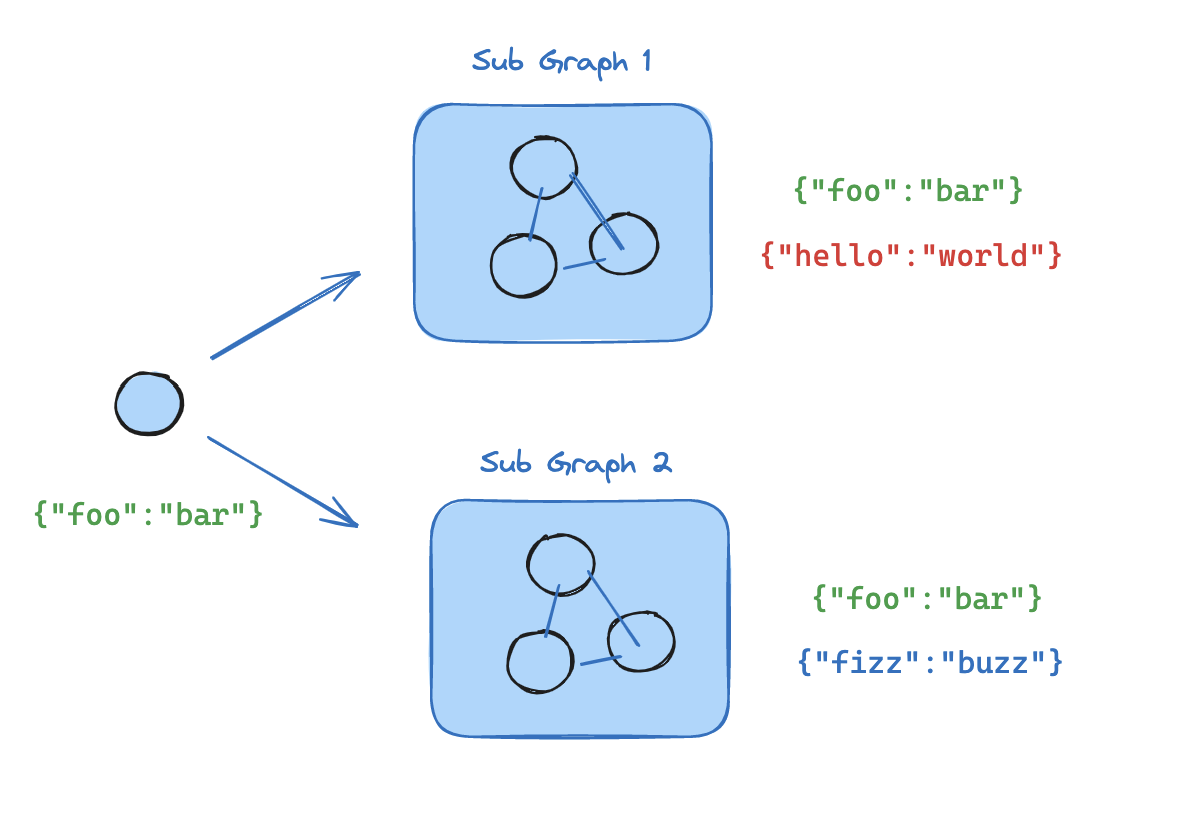
将子图作为节点添加 当父图和子图共享状态键 时,您可以直接将编译的子图传递给 add_node。不需要包装函数—子图自动从父图的状态通道读取并写入到父图的状态通道。例如,在多 Agent 系统中,Agent 通常通过共享的messages 键进行通信。
如果您的子图与父图共享状态键,您可以按照以下步骤将其添加到您的图中:
定义子图工作流(下面示例中的 subgraph_builder)并编译它
在定义父图工作流时,将编译的子图传递给add_node
from typing_extensions import TypedDict from langgraph . graph . state import StateGraph , START class State ( TypedDict ): foo : str # 子图 def subgraph_node_1 ( state : State ): return { "foo" : "hi! " + state [ " foo " ]} subgraph_builder = StateGraph ( State ) subgraph_builder . add_node ( subgraph_node_1 ) subgraph_builder . add_edge ( START , "subgraph_node_1" ) subgraph = subgraph_builder . compile () # 父图 builder = StateGraph ( State ) builder . add_node ( "node_1" , subgraph ) builder . add_edge ( START , "node_1" ) graph = builder . compile ()
from typing_extensions import TypedDict from langgraph . graph . state import StateGraph , START # 定义子图 class SubgraphState ( TypedDict ): foo : str # 与父图状态共享 bar : str # 对 SubgraphState 私有 def subgraph_node_1 ( state : SubgraphState ): return { "bar" : "bar" } def subgraph_node_2 ( state : SubgraphState ): # 注意此节点使用仅在子图中可用的状态键('bar') # 并在共享状态键('foo')上发送更新 return { "foo" : state [ " foo " ] + state [ " bar " ]} subgraph_builder = StateGraph ( SubgraphState ) subgraph_builder . add_node ( subgraph_node_1 ) subgraph_builder . add_node ( subgraph_node_2 ) subgraph_builder . add_edge ( START , "subgraph_node_1" ) subgraph_builder . add_edge ( "subgraph_node_1" , "subgraph_node_2" ) subgraph = subgraph_builder . compile () # 定义父图 class ParentState ( TypedDict ): foo : str def node_1 ( state : ParentState ): return { "foo" : "hi! " + state [ " foo " ]} builder = StateGraph ( ParentState ) builder . add_node ( "node_1" , node_1 ) builder . add_node ( "node_2" , subgraph ) builder . add_edge ( START , "node_1" ) builder . add_edge ( "node_1" , "node_2" ) graph = builder . compile () for chunk in graph . stream ({ "foo" : "foo" }, version = "v2" ): if chunk [ " type " ] == "updates" : print ( chunk [ " data " ])
{'node_1': {'foo': 'hi! foo'}}
{'node_2': {'foo': 'hi! foobar'}}
子图持久化 使用子图时,您需要决定其内部数据在调用之间会发生什么。考虑一个委托给专家子 Agent 的客户支持机器人:“计费专家”子 Agent 是否应该记住客户的早期问题,还是每次调用时重新开始?
.compile() 上的 checkpointer 参数控制子图持久化:模式 checkpointer=行为 每次调用 None(默认)每次调用都重新开始,并继承父图的检查点器以支持单次调用内的中断 和持久执行 。 每线程 True状态在同一线程上的调用之间累积。每次调用都从上一次停止的地方继续。 无状态 False完全没有检查点—像普通函数调用一样运行。没有中断或持久执行。
对于大多数应用程序(包括子 Agent 处理独立请求的多 Agent 系统),每次调用是正确的选择。当子 Agent 需要多轮对话记忆时(例如,通过几次交换建立上下文的研究助手),使用每线程。
父图必须使用检查点器编译,子图持久化功能(中断、状态检查、每线程记忆)才能工作。请参阅持久化 。 下面的示例使用 LangChain 的create_agentcreate_agent 在底层生成一个LangGraph 图 ,因此所有子图持久化概念都直接适用。如果您使用原始 LangGraph StateGraph 构建,相同的模式和配置选项适用—请参阅图 API 了解详细信息。 有状态 有状态的子图继承父图的检查点器,这启用了中断 、持久执行 和状态检查。两种有状态模式在状态保留的时间长度上有所不同。
每次调用(默认) 这是大多数应用程序的推荐模式,包括子 Agent 作为工具被调用的多 Agent 系统。它支持中断、持久执行 和并行调用,同时保持每次调用隔离。 当对子图的每次调用都是独立的,并且子 Agent 不需要记住以前调用的任何内容时,使用每次调用持久化。这是最常见的模式,特别是对于子 Agent 处理一次性请求(如”查找此客户的订单”或”总结此文档”)的多 Agent 系统。
省略 checkpointer 或将其设置为 None。每次调用都重新开始,但在单次调用中,子图继承父图的检查点器并可以使用 interrupt() 来暂停和恢复。
以下示例使用两个子 Agent(水果专家、蔬菜专家)作为外部 Agent 的工具包装:
from langchain . agents import create_agent from langchain . tools import tool from langgraph . checkpoint . memory import MemorySaver from langgraph . types import Command , interrupt @tool def fruit_info ( fruit_name : str ) -> str : """查找水果信息。""" return f "Info about { fruit_name } " @tool def veggie_info ( veggie_name : str ) -> str : """查找蔬菜信息。""" return f "Info about { veggie_name } " # 子 Agent - 没有检查点器设置(继承父) fruit_agent = create_agent ( model = "gpt-4.1-mini" , tools = [ fruit_info ], prompt = "您是水果专家。使用 fruit_info 工具。用一句话回答。" , ) veggie_agent = create_agent ( model = "gpt-4.1-mini" , tools = [ veggie_info ], prompt = "您是蔬菜专家。使用 veggie_info 工具。用一句话回答。" , ) # 将子 Agent 包装为外部 Agent 的工具 @tool def ask_fruit_expert ( question : str ) -> str : """询问水果专家。用于所有水果问题。""" response = fruit_agent . invoke ( { "messages" : [{ "role" : "user" , "content" : question }]}, ) return response [ " messages " ][ - 1 ]. content @tool def ask_veggie_expert ( question : str ) -> str : """询问蔬菜专家。用于所有蔬菜问题。""" response = veggie_agent . invoke ( { "messages" : [{ "role" : "user" , "content" : question }]}, ) return response [ " messages " ][ - 1 ]. content # 带有检查点器的外部 Agent agent = create_agent ( model = "gpt-4.1-mini" , tools = [ ask_fruit_expert , ask_veggie_expert ], prompt = ( "您有两个专家:ask_fruit_expert 和 ask_veggie_expert。" "始终将问题委托给适当的专家。" ), checkpointer = MemorySaver (), )
每次调用都可以使用 interrupt() 来暂停和恢复。将 interrupt() 添加到工具函数以在继续之前要求用户批准: @tool def fruit_info ( fruit_name : str ) -> str : """查找水果信息。""" interrupt ( "continue?" ) return f "Info about { fruit_name } "
config = { "configurable" : { "thread_id" : "1" }} # 调用 - 子 Agent 的工具调用 interrupt() response = agent . invoke ( { "messages" : [{ "role" : "user" , "content" : "告诉我关于苹果的信息" }]}, config = config , ) # response 包含 __interrupt__ # 恢复 - 批准中断 response = agent . invoke ( Command ( resume = True ), config = config ) # 子 Agent 消息计数:4
每次调用都以新鲜的子 Agent 状态开始。子 Agent 不记得以前的调用: config = { "configurable" : { "thread_id" : "1" }} # 第一次调用 response = agent . invoke ( { "messages" : [{ "role" : "user" , "content" : "告诉我关于苹果的信息" }]}, config = config , ) # 子 Agent 消息计数:4 # 第二次调用 - 子 Agent 重新开始,没有关于苹果的记忆 response = agent . invoke ( { "messages" : [{ "role" : "user" , "content" : "现在告诉我关于香蕉的信息" }]}, config = config , ) # 子 Agent 消息计数:4(仍然是新鲜的!)
对同一子图的多次调用没有冲突,因为每次调用都有自己的检查点命名空间: config = { "configurable" : { "thread_id" : "1" }} # LLM 为苹果和香蕉调用 ask_fruit_expert response = agent . invoke ( { "messages" : [{ "role" : "user" , "content" : "告诉我关于苹果和香蕉的信息" }]}, config = config , ) # 子 Agent 消息计数:4(苹果 - 新鲜) # 子 Agent 消息计数:4(香蕉 - 新鲜)
每线程 当子 Agent 需要记住以前的交互时,使用每线程持久化。例如,通过几次交换建立上下文的研究助手,或跟踪已编辑文件的编程助手。子 Agent 的对话历史记录和数据在同一线程上的调用之间累积。每次调用都从上一次停止的地方继续。
使用 checkpointer=True 编译以启用此行为。
每线程子图不支持并行工具调用。当 LLM 可以访问每线程子 Agent 作为工具时,它可能会尝试多次并行调用该工具(例如,同时询问水果专家关于苹果和香蕉的信息)。这会导致检查点冲突,因为两次调用都写入相同的命名空间。 下面的示例使用 LangChain 的 ToolCallLimitMiddleware 来防止这种情况。如果您使用纯 LangGraph StateGraph 构建,您需要自己防止并行工具调用—例如,通过配置模型以禁用并行工具调用或添加逻辑以确保同一子图不会被多次并行调用。
以下示例使用带有 checkpointer=True 编译的水果专家子 Agent:
from langchain . agents import create_agent from langchain . agents . middleware import ToolCallLimitMiddleware from langchain . tools import tool from langgraph . checkpoint . memory import MemorySaver from langgraph . types import Command , interrupt @tool def fruit_info ( fruit_name : str ) -> str : """查找水果信息。""" return f "Info about { fruit_name } " # 带有 checkpointer=True 的子 Agent,用于持久状态 fruit_agent = create_agent ( model = "gpt-4.1-mini" , tools = [ fruit_info ], prompt = "您是水果专家。使用 fruit_info 工具。用一句话回答。" , checkpointer = True , ) # 将子 Agent 包装为外部 Agent 的工具 @tool def ask_fruit_expert ( question : str ) -> str : """询问水果专家。用于所有水果问题。""" response = fruit_agent . invoke ( { "messages" : [{ "role" : "user" , "content" : question }]}, ) return response [ " messages " ][ - 1 ]. content @tool def ask_veggie_expert ( question : str ) -> str : """询问蔬菜专家。用于所有蔬菜问题。""" response = veggie_agent . invoke ( { "messages" : [{ "role" : "user" , "content" : question }]}, ) return response [ " messages " ][ - 1 ]. content # 带有检查点器的外部 Agent agent = create_agent ( model = "gpt-4.1-mini" , tools = [ ask_fruit_expert , ask_veggie_expert ], prompt = ( "您有两个专家:ask_fruit_expert 和 ask_veggie_expert。" "始终将问题委托给适当的专家。" ), checkpointer = MemorySaver (), )
每次调用都可以使用 interrupt() 来暂停和恢复。将 interrupt() 添加到工具函数以在继续之前要求用户批准: @tool def fruit_info ( fruit_name : str ) -> str : """查找水果信息。""" interrupt ( "continue?" ) return f "Info about { fruit_name } "
config = { "configurable" : { "thread_id" : "1" }} # 调用 - 子 Agent 的工具调用 interrupt() response = agent . invoke ( { "messages" : [{ "role" : "user" , "content" : "告诉我关于苹果的信息" }]}, config = config , ) # response 包含 __interrupt__ # 恢复 - 批准中断 response = agent . invoke ( Command ( resume = True ), config = config ) # 子 Agent 消息计数:4
状态在调用之间累积—子 Agent 记住过去的对话: config = { "configurable" : { "thread_id" : "1" }} # 第一次调用 response = agent . invoke ( { "messages" : [{ "role" : "user" , "content" : "告诉我关于苹果的信息" }]}, config = config , ) # 子 Agent 消息计数:4 # 第二次调用 - 子 Agent 记住苹果对话 response = agent . invoke ( { "messages" : [{ "role" : "user" , "content" : "现在告诉我关于香蕉的信息" }]}, config = config , ) # 子 Agent 消息计数:8(累积了!)
当您有多个不同的 每线程子图(例如,水果专家和蔬菜专家)时,每个都需要自己的存储空间,以便它们的检查点不会相互覆盖。这称为命名空间隔离 。 如果您在节点内调用子图 ,LangGraph 根据调用顺序(第一次调用、第二次调用等)分配命名空间。这意味着重新排序调用可能会混淆哪个子图加载哪个状态。为避免这种情况,将每个子 Agent 包装在自己的 StateGraph 中,具有唯一的节点名称—这为每个子图提供稳定、唯一的命名空间: from langgraph . graph import MessagesState , StateGraph def create_sub_agent ( model , * , name , ** kwargs ): """用唯一的节点名称包装 Agent 以进行命名空间隔离。""" agent = create_agent ( model = model , name = name , ** kwargs ) return ( StateGraph ( MessagesState ) . add_node ( name , agent ) # 唯一名称 → 稳定命名空间 # . add_edge ( "__start__" , name ) . compile () ) fruit_agent = create_sub_agent ( "gpt-4.1-mini" , name = "fruit_agent" , tools = [ fruit_info ], prompt = "..." , checkpointer = True , ) veggie_agent = create_sub_agent ( "gpt-4.1-mini" , name = "veggie_agent" , tools = [ veggie_info ], prompt = "..." , checkpointer = True , ) config = { "configurable" : { "thread_id" : "1" }} # 第一次调用 - LLM 调用水果和蔬菜专家 response = agent . invoke ( { "messages" : [{ "role" : "user" , "content" : "告诉我关于樱桃和西兰花的信息" }]}, config = config , ) # 水果子 Agent 消息计数:4 # 蔬菜子 Agent 消息计数:4 # 第二次调用 - 两个 Agent 独立累积 response = agent . invoke ( { "messages" : [{ "role" : "user" , "content" : "现在告诉我关于橙子和胡萝卜的信息" }]}, config = config , ) # 水果子 Agent 消息计数:8(记住了樱桃!) # 蔬菜子 Agent 消息计数:8(记住了西兰花!)
作为节点添加 的子图已经自动获得基于名称的命名空间,因此它们不需要这个包装器。无状态 当您希望像普通函数调用一样运行子 Agent 而没有检查点开销时使用此模式。子图无法暂停/恢复,也不会从持久执行 中受益。使用 checkpointer=False 编译。
没有检查点,子图没有持久执行。如果进程在运行中途崩溃,子图无法恢复,必须从头开始重新运行。
subgraph_builder = StateGraph ( ... ) subgraph = subgraph_builder . compile ( checkpointer = False )
检查点器参考 使用 .compile() 上的 checkpointer 参数控制子图持久化:
subgraph = builder . compile ( checkpointer = False ) # 或 True / None
功能 每次调用(默认) 每线程 无状态 checkpointer=NoneTrueFalse中断(HITL) ✅ ✅ ❌ 多轮记忆 ❌ ✅ ❌ 多次调用(不同的子图) ✅ ⚠️ ✅ 多次调用(相同的子图) ✅ ❌ ✅ 状态检查 ⚠️ ✅ ❌
中断(HITL) :子图可以使用 interrupt() 暂停执行并等待用户输入,然后从停止的地方恢复。多轮记忆 :子图在同一线程 内的多次调用中保留其状态。每次调用都从上一次停止的地方继续,而不是重新开始。多次调用(不同的子图) :可以在单个节点内调用多个不同的子图实例,而不会发生检查点命名空间冲突。多次调用(相同的子图) :同一子图实例可以在单个节点内被多次调用。使用有状态持久化时,这些调用写入相同的检查点命名空间并冲突—改用每次调用持久化。状态检查 :子图的状态可以通过 get_state(config, subgraphs=True) 用于调试和监视。
查看子图状态 当您启用持久化 时,您可以使用子图选项检查子图状态。使用无状态 检查点(checkpointer=False),不保存子图检查点,因此子图状态不可用。
仅返回当前调用 的子图状态。每次调用都重新开始。 from langgraph . graph import START , StateGraph from langgraph . checkpoint . memory import MemorySaver from langgraph . types import interrupt , Command from typing_extensions import TypedDict class State ( TypedDict ): foo : str # 子图 def subgraph_node_1 ( state : State ): value = interrupt ( "提供值:" ) return { "foo" : state [ " foo " ] + value } subgraph_builder = StateGraph ( State ) subgraph_builder . add_node ( subgraph_node_1 ) subgraph_builder . add_edge ( START , "subgraph_node_1" ) subgraph = subgraph_builder . compile () # 继承父检查点器 # 父图 builder = StateGraph ( State ) builder . add_node ( "node_1" , subgraph ) builder . add_edge ( START , "node_1" ) checkpointer = MemorySaver () graph = builder . compile ( checkpointer = checkpointer ) config = { "configurable" : { "thread_id" : "1" }} graph . invoke ({ "foo" : "" }, config ) # 查看当前调用的子图状态 subgraph_state = graph . get_state ( config , subgraphs = True ). tasks [ 0 ]. state # 恢复子图 graph . invoke ( Command ( resume = "bar" ), config )
返回在此线程上的所有调用中累积 的子图状态。 from langgraph . graph import START , StateGraph , MessagesState from langgraph . checkpoint . memory import MemorySaver # 带有自己的持久状态的子图 subgraph_builder = StateGraph ( MessagesState ) # ... 添加节点和边 subgraph = subgraph_builder . compile ( checkpointer = True ) # 父图 builder = StateGraph ( MessagesState ) builder . add_node ( "agent" , subgraph ) builder . add_edge ( START , "agent" ) checkpointer = MemorySaver () graph = builder . compile ( checkpointer = checkpointer ) config = { "configurable" : { "thread_id" : "1" }} graph . invoke ({ "messages" : [{ "role" : "user" , "content" : "嗨" }]}, config ) graph . invoke ({ "messages" : [{ "role" : "user" , "content" : "我说了什么?" }]}, config ) # 查看累积的子图状态(包括来自两次调用的消息) subgraph_state = graph . get_state ( config , subgraphs = True ). tasks [ 0 ]. state
流式传输子图输出 要在流式输出中包含来自子图的输出,您可以在父图的 stream 方法中设置子图选项。这将流式传输来自父图和任何子图的输出。
v2 (LangGraph >= 1.1)
v1 (默认)
使用 version="v2",子图事件使用相同的 StreamPart 格式。ns 字段标识源图: for chunk in graph . stream ( { "foo" : "foo" }, subgraphs = True , stream_mode = "updates" , version = "v2" , ): print ( chunk [ " type " ]) # "updates" print ( chunk [ " ns " ]) # () 用于根,("node_2:<task_id>",) 用于子图 print ( chunk [ " data " ]) # {"node_name": {"key": "value"}}
for chunk in graph . stream ( { "foo" : "foo" }, subgraphs = True , stream_mode = "updates" , ): print ( chunk )
from typing_extensions import TypedDict from langgraph . graph . state import StateGraph , START # 定义子图 class SubgraphState ( TypedDict ): foo : str bar : str def subgraph_node_1 ( state : SubgraphState ): return { "bar" : "bar" } def subgraph_node_2 ( state : SubgraphState ): # 注意此节点使用仅在子图中可用的状态键('bar') # 并在共享状态键('foo')上发送更新 return { "foo" : state [ " foo " ] + state [ " bar " ]} subgraph_builder = StateGraph ( SubgraphState ) subgraph_builder . add_node ( subgraph_node_1 ) subgraph_builder . add_node ( subgraph_node_2 ) subgraph_builder . add_edge ( START , "subgraph_node_1" ) subgraph_builder . add_edge ( "subgraph_node_1" , "subgraph_node_2" ) subgraph = subgraph_builder . compile () # 定义父图 class ParentState ( TypedDict ): foo : str def node_1 ( state : ParentState ): return { "foo" : "hi! " + state [ " foo " ]} builder = StateGraph ( ParentState ) builder . add_node ( "node_1" , node_1 ) builder . add_node ( "node_2" , subgraph ) builder . add_edge ( START , "node_1" ) builder . add_edge ( "node_1" , "node_2" ) graph = builder . compile () for chunk in graph . stream ( { "foo" : "foo" }, stream_mode = "updates" , subgraphs = True , version = "v2" , ): if chunk [ " type " ] == "updates" : print ( chunk [ " ns " ], chunk [ " data " ])
() {'node_1': {'foo': 'hi! foo'}}
('node_2:e58e5673-a661-ebb0-70d4-e298a7fc28b7',) {'subgraph_node_1': {'bar': 'bar'}}
('node_2:e58e5673-a661-ebb0-70d4-e298a7fc28b7',) {'subgraph_node_2': {'foo': 'hi! foobar'}}
() {'node_2': {'foo': 'hi! foobar'}}
通过 MCP 将这些文档连接到 Claude、VSCode 等以获取实时答案。


 如果您的子图与父图共享状态键,您可以按照以下步骤将其添加到您的图中: