

在本教程中,我们将使用 LangGraph 构建一个能够回答 SQL 数据库问题的自定义 Agent。 LangChain 提供了内置的 agent 实现,使用 LangGraph 原语实现。如果需要更深入的定制,可以直接在 LangGraph 中实现 Agent。本指南演示了 SQL Agent 的示例实现。关于实际介绍,请参阅使用高级 LangChain 抽象构建 SQL Agent
构建 SQL 数据库问答系统需要执行模型生成的 SQL 查询。这样做存在固有的风险。请确保您的数据库连接权限始终尽可能狭窄地限定在 Agent 的需求范围内。这将减轻(虽然不能消除)构建模型驱动系统的风险。
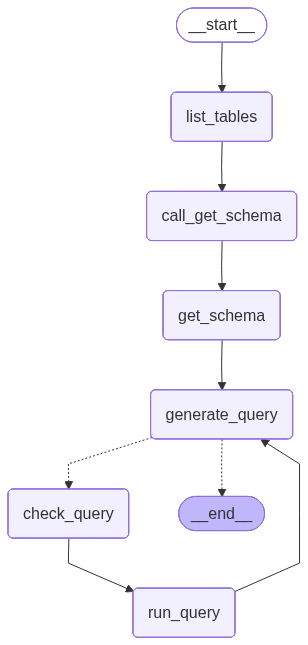
预构建的 Agent 让我们可以快速开始,但我们依靠系统提示来约束其行为——例如,我们指示 Agent 始终从”列出表”工具开始,并且在执行查询之前始终运行查询检查工具。 我们可以通过在 LangGraph 中定制 Agent 来实施更高程度的控制。在这里,我们实现了一个简单的 ReAct-Agent 设置,为特定的工具调用设置了专门的节点。我们将使用与预构建 Agent 相同的[状态]。

概念

我们将涵盖以下概念:

设置

安装

pip install langchain  langgraph  langchain-community

LangSmith

Set up LangSmith to inspect what is happening inside your chain or agent. Then set the following environment variables:
export LANGSMITH_TRACING="true"
export LANGSMITH_API_KEY="..."

1. 选择 LLM

Select a model that supports tool-calling:
👉 Read the OpenAI chat model integration docs
pip install -U "langchain[openai]"
import os
from langchain.chat_models import init_chat_model

os.environ["OPENAI_API_KEY"] = "sk-..."

model = init_chat_model("gpt-5.2")
The output shown in the examples below used OpenAI.

2. 配置数据库

You will be creating a SQLite database for this tutorial. SQLite is a lightweight database that is easy to set up and use. We will be loading the chinook database, which is a sample database that represents a digital media store. For convenience, we have hosted the database (Chinook.db) on a public GCS bucket.
import requests, pathlib

url = "https://storage.googleapis.com/benchmarks-artifacts/chinook/Chinook.db"
local_path = pathlib.Path("Chinook.db")

if local_path.exists():
    print(f"{local_path} 已经存在,跳过下载。")
else:
    response = requests.get(url)
    if response.status_code == 200:
        local_path.write_bytes(response.content)
        print(f"文件已下载并保存为 {local_path}")
    else:
        print(f"下载文件失败。状态码:{response.status_code}")
We will use a handy SQL database wrapper available in the langchain_community package to interact with the database. The wrapper provides a simple interface to execute SQL queries and fetch results:
from langchain_community.utilities import SQLDatabase

db = SQLDatabase.from_uri("sqlite:///Chinook.db")

print(f"方言:{db.dialect}")
print(f"可用表:{db.get_usable_table_names()}")
print(f'示例输出:{db.run("SELECT * FROM Artist LIMIT 5;")}')
方言:sqlite
可用表:['Album', 'Artist', 'Customer', 'Employee', 'Genre', 'Invoice', 'InvoiceLine', 'MediaType', 'Playlist', 'PlaylistTrack', 'Track']
示例输出:[(1, 'AC/DC'), (2, 'Accept'), (3, 'Aerosmith'), (4, 'Alanis Morissette'), (5, 'Alice In Chains')]

3. 添加数据库交互工具

Use the SQLDatabase wrapper available in the langchain_community package to interact with the database. The wrapper provides a simple interface to execute SQL queries and fetch results:
from langchain_community.agent_toolkits import SQLDatabaseToolkit

toolkit = SQLDatabaseToolkit(db=db, llm=model)

tools = toolkit.get_tools()

for tool in tools:
    print(f"{tool.name}: {tool.description}\n")
sql_db_query: 此工具的输入是详细且正确的 SQL 查询,输出是数据库的结果。如果查询不正确,将返回错误消息。如果返回错误,请重写查询、检查查询,然后重试。如果您遇到 Unknown column 'xxxx' in 'field list' 问题,请使用 sql_db_schema 查询正确的表字段。

sql_db_schema: 此工具的输入是以逗号分隔的表列表,输出是这些表的模式和相关行示例。请确保先调用 sql_db_list_tables 来验证表确实存在!示例输入:table1, table2, table3

sql_db_list_tables: 输入是空字符串,输出是数据库中以逗号分隔的表列表。

sql_db_query_checker: 在执行查询之前使用此工具仔细检查您的查询是否正确。在使用 sql_db_query 执行查询之前,请始终使用此工具!

4. 定义应用程序步骤

We construct dedicated nodes for the following steps:
  • Listing DB tables
  • Calling the “get schema” tool
  • Generating a query
  • Checking the query
Putting these steps in dedicated nodes lets us (1) force tool-calls when needed, and (2) customize the prompts associated with each step.
from typing import Literal

from langchain.messages import AIMessage
from langchain_core.runnables import RunnableConfig
from langgraph.graph import END, START, MessagesState, StateGraph
from langgraph.prebuilt import ToolNode


get_schema_tool = next(tool for tool in tools if tool.name == "sql_db_schema")
get_schema_node = ToolNode([get_schema_tool], name="get_schema")

run_query_tool = next(tool for tool in tools if tool.name == "sql_db_query")
run_query_node = ToolNode([run_query_tool], name="run_query")


# 示例:创建预定的工具调用
def list_tables(state: MessagesState):
    tool_call = {
        "name": "sql_db_list_tables",
        "args": {},
        "id": "abc123",
        "type": "tool_call",
    }
    tool_call_message = AIMessage(content="", tool_calls=[tool_call])

    list_tables_tool = next(tool for tool in tools if tool.name == "sql_db_list_tables")
    tool_message = list_tables_tool.invoke(tool_call)
    response = AIMessage(f"可用表:{tool_message.content}")

    return {"messages": [tool_call_message, tool_message, response]}


# 示例:强制模型创建工具调用
def call_get_schema(state: MessagesState):
    # 注意 LangChain 要求所有模型接受 `tool_choice="any"`
    # 以及 `tool_choice=<工具名称字符串>`。
    llm_with_tools = model.bind_tools([get_schema_tool], tool_choice="any")
    response = llm_with_tools.invoke(state["messages"])

    return {"messages": [response]}


generate_query_system_prompt = """
您是一个旨在与 SQL 数据库交互的 Agent。
给定输入问题,创建一个语法正确的 {dialect} 查询来运行,
然后查看查询结果并返回答案。除非用户指定他们希望获取的特定数量的示例,
否则始终将查询限制为最多 {top_k} 个结果。

您可以按相关列对结果进行排序,以返回数据库中最有趣的示例。
不要从特定表中查询所有列,只询问与问题相关给定问题的相关列。

不要对数据库执行任何 DML 语句(INSERT、UPDATE、DELETE、DROP 等)。
""".format(
    dialect=db.dialect,
    top_k=5,
)


def generate_query(state: MessagesState):

5. Implement the agent

We can now assemble these steps into a workflow using the Graph API. We define a conditional edge at the query generation step that will route to the query checker if a query is generated, or end if there are no tool calls present, such that the LLM has delivered a response to the query.
def should_continue(state: MessagesState) -> Literal[END, "check_query"]:
    messages = state["messages"]
    last_message = messages[-1]
    if not last_message.tool_calls:
        return END
    else:
        return "check_query"


builder = StateGraph(MessagesState)
builder.add_node(list_tables)
builder.add_node(call_get_schema)
builder.add_node(get_schema_node, "get_schema")
builder.add_node(generate_query)
builder.add_node(check_query)
builder.add_node(run_query_node, "run_query")

builder.add_edge(START, "list_tables")
builder.add_edge("list_tables", "call_get_schema")
builder.add_edge("call_get_schema", "get_schema")
builder.add_edge("get_schema", "generate_query")
builder.add_conditional_edges(
    "generate_query",
    should_continue,
)
builder.add_edge("check_query", "run_query")
builder.add_edge("run_query", "generate_query")

agent = builder.compile()
We visualize the application below:
from IPython.display import Image, display
from langchain_core.runnables.graph import CurveStyle, MermaidDrawMethod, NodeStyles

display(Image(agent.get_graph().draw_mermaid_png()))
SQL agent graph We can now invoke the graph:
question = "Which genre on average has the longest tracks?"

for step in agent.stream(
    {"messages": [{"role": "user", "content": question}]},
    stream_mode="values",
):
    step["messages"][-1].pretty_print()
================================ Human Message =================================

Which genre on average has the longest tracks?
================================== Ai Message ==================================

Available tables: Album, Artist, Customer, Employee, Genre, Invoice, InvoiceLine, MediaType, Playlist, PlaylistTrack, Track
================================== Ai Message ==================================
Tool Calls:
  sql_db_schema (call_yzje0tj7JK3TEzDx4QnRR3lL)
 Call ID: call_yzje0tj7JK3TEzDx4QnRR3lL
  Args:
    table_names: Genre, Track
================================= Tool Message =================================
Name: sql_db_schema


CREATE TABLE "Genre" (
	"GenreId" INTEGER NOT NULL,
	"Name" NVARCHAR(120),
	PRIMARY KEY ("GenreId")
)

/*
3 rows from Genre table:
GenreId	Name
1	Rock
2	Jazz
3	Metal
*/


CREATE TABLE "Track" (
	"TrackId" INTEGER NOT NULL,
	"Name" NVARCHAR(200) NOT NULL,
	"AlbumId" INTEGER,
	"MediaTypeId" INTEGER NOT NULL,
	"GenreId" INTEGER,
	"Composer" NVARCHAR(220),
	"Milliseconds" INTEGER NOT NULL,
	"Bytes" INTEGER,
	"UnitPrice" NUMERIC(10, 2) NOT NULL,
	PRIMARY KEY ("TrackId"),
	FOREIGN KEY("MediaTypeId") REFERENCES "MediaType" ("MediaTypeId"),
	FOREIGN KEY("GenreId") REFERENCES "Genre" ("GenreId"),
	FOREIGN KEY("AlbumId") REFERENCES "Album" ("AlbumId")
)

/*
3 rows from Track table:
TrackId	Name	AlbumId	MediaTypeId	GenreId	Composer	Milliseconds	Bytes	UnitPrice
1	For Those About To Rock (We Salute You)	1	1	1	Angus Young, Malcolm Young, Brian Johnson	343719	11170334	0.99
2	Balls to the Wall	2	2	1	U. Dirkschneider, W. Hoffmann, H. Frank, P. Baltes, S. Kaufmann, G. Hoffmann	342562	5510424	0.99
3	Fast As a Shark	3	2	1	F. Baltes, S. Kaufman, U. Dirkscneider & W. Hoffman	230619	3990994	0.99
*/
================================== Ai Message ==================================
Tool Calls:
  sql_db_query (call_cb9ApLfZLSq7CWg6jd0im90b)
 Call ID: call_cb9ApLfZLSq7CWg6jd0im90b
  Args:
    query: SELECT Genre.Name, AVG(Track.Milliseconds) AS AvgMilliseconds FROM Track JOIN Genre ON Track.GenreId = Genre.GenreId GROUP BY Genre.GenreId ORDER BY AvgMilliseconds DESC LIMIT 5;
================================== Ai Message ==================================
Tool Calls:
  sql_db_query (call_DMVALfnQ4kJsuF3Yl6jxbeAU)
 Call ID: call_DMVALfnQ4kJsuF3Yl6jxbeAU
  Args:
    query: SELECT Genre.Name, AVG(Track.Milliseconds) AS AvgMilliseconds FROM Track JOIN Genre ON Track.GenreId = Genre.GenreId GROUP BY Genre.GenreId ORDER BY AvgMilliseconds DESC LIMIT 5;
================================= Tool Message =================================
Name: sql_db_query

[('Sci Fi & Fantasy', 2911783.0384615385), ('Science Fiction', 2625549.076923077), ('Drama', 2575283.78125), ('TV Shows', 2145041.0215053763), ('Comedy', 1585263.705882353)]
================================== Ai Message ==================================

The genre with the longest tracks on average is "Sci Fi & Fantasy," with an average track length of approximately 2,911,783 milliseconds. Other genres with relatively long tracks include "Science Fiction," "Drama," "TV Shows," and "Comedy."
See LangSmith trace for the above run.

6. Implement human-in-the-loop review

It can be prudent to check the agent’s SQL queries before they are executed for any unintended actions or inefficiencies. Here we leverage LangGraph’s human-in-the-loop features to pause the run before executing a SQL query and wait for human review. Using LangGraph’s persistence layer, we can pause the run indefinitely (or at least as long as the persistence layer is alive). Let’s wrap the sql_db_query tool in a node that receives human input. We can implement this using the interrupt function. Below, we allow for input to approve the tool call, edit its arguments, or provide user feedback.
from langchain_core.runnables import RunnableConfig
from langchain.tools import tool
from langgraph.types import interrupt

@tool(
    run_query_tool.name,
    description=run_query_tool.description,
    args_schema=run_query_tool.args_schema
)
def run_query_tool_with_interrupt(config: RunnableConfig, **tool_input):
    request = {
        "action": run_query_tool.name,
        "args": tool_input,
        "description": "Please review the tool call"
    }
    response = interrupt([request])
    # approve the tool call
    if response["type"] == "accept":
        tool_response = run_query_tool.invoke(tool_input, config)
    # update tool call args
    elif response["type"] == "edit":
        tool_input = response["args"]["args"]
        tool_response = run_query_tool.invoke(tool_input, config)
    # respond to the LLM with user feedback
    elif response["type"] == "response":
        user_feedback = response["args"]
        tool_response = user_feedback
    else:
        raise ValueError(f"Unsupported interrupt response type: {response['type']}")

    return tool_response

# Redefine the tool node to use the interrupt version
run_query_node = ToolNode([run_query_tool_with_interrupt], name="run_query")
The above implementation follows the tool interrupt example in the broader human-in-the-loop guide. Refer to that guide for details and alternatives.
Let’s now re-assemble our graph. We will replace the programmatic check with human review. Note that we now include a checkpointer; this is required to pause and resume the run.
from langgraph.checkpoint.memory import InMemorySaver

def should_continue(state: MessagesState) -> Literal[END, "run_query"]:
    messages = state["messages"]
    last_message = messages[-1]
    if not last_message.tool_calls:
        return END
    else:
        return "run_query"

builder = StateGraph(MessagesState)
builder.add_node(list_tables)
builder.add_node(call_get_schema)
builder.add_node(get_schema_node, "get_schema")
builder.add_node(generate_query)
builder.add_node(run_query_node, "run_query")

builder.add_edge(START, "list_tables")
builder.add_edge("list_tables", "call_get_schema")
builder.add_edge("call_get_schema", "get_schema")
builder.add_edge("get_schema", "generate_query")
builder.add_conditional_edges(
    "generate_query",
    should_continue,
)
builder.add_edge("run_query", "generate_query")

checkpointer = InMemorySaver()
agent = builder.compile(checkpointer=checkpointer)
We can invoke the graph as before. This time, execution is interrupted:
import json

config = {"configurable": {"thread_id": "1"}}

question = "Which genre on average has the longest tracks?"

for step in agent.stream(
    {"messages": [{"role": "user", "content": question}]},
    config,
    stream_mode="values",
):
    if "messages" in step:
        step["messages"][-1].pretty_print()
    elif "__interrupt__" in step:
        action = step["__interrupt__"][0]
        print("INTERRUPTED:")
        for request in action.value:
            print(json.dumps(request, indent=2))
    else:
        pass
...

INTERRUPTED:
{
  "action": "sql_db_query",
  "args": {
    "query": "SELECT Genre.Name, AVG(Track.Milliseconds) AS AvgLength FROM Track JOIN Genre ON Track.GenreId = Genre.GenreId GROUP BY Genre.Name ORDER BY AvgLength DESC LIMIT 5;"
  },
  "description": "Please review the tool call"
}
We can accept or edit the tool call using Command:
from langgraph.types import Command


for step in agent.stream(
    Command(resume={"type": "accept"}),
    # Command(resume={"type": "edit", "args": {"query": "..."}}),
    config,
    stream_mode="values",
):
    if "messages" in step:
        step["messages"][-1].pretty_print()
    elif "__interrupt__" in step:
        action = step["__interrupt__"][0]
        print("INTERRUPTED:")
        for request in action.value:
            print(json.dumps(request, indent=2))
    else:
        pass
================================== Ai Message ==================================
Tool Calls:
  sql_db_query (call_t4yXkD6shwdTPuelXEmY3sAY)
 Call ID: call_t4yXkD6shwdTPuelXEmY3sAY
  Args:
    query: SELECT Genre.Name, AVG(Track.Milliseconds) AS AvgLength FROM Track JOIN Genre ON Track.GenreId = Genre.GenreId GROUP BY Genre.Name ORDER BY AvgLength DESC LIMIT 5;
================================= Tool Message =================================
Name: sql_db_query

[('Sci Fi & Fantasy', 2911783.0384615385), ('Science Fiction', 2625549.076923077), ('Drama', 2575283.78125), ('TV Shows', 2145041.0215053763), ('Comedy', 1585263.705882353)]
================================== Ai Message ==================================

The genre with the longest average track length is "Sci Fi & Fantasy" with an average length of about 2,911,783 milliseconds. Other genres with long average track lengths include "Science Fiction," "Drama," "TV Shows," and "Comedy."
Refer to the human-in-the-loop guide for details.

Next steps

Check out the Evaluate a graph guide for evaluating LangGraph applications, including SQL agents like this one, using LangSmith.