本指南演示 LangGraph Graph API 的基础知识。它涵盖了状态 的定义和更新,以及组成常见图结构如序列 、分支 和循环 。它还涵盖了 LangGraph 的控制功能,包括用于 map-reduce 工作流的Send API 和用于将状态更新与节点之间的”跳跃”结合的Command API 。
安装 langgraph:
设置 LangSmith 以便更好地调试 注册 LangSmith 以快速发现问题并提高 LangGraph 项目的性能。LangSmith 让您使用跟踪数据来调试、测试和监控使用 LangGraph 构建的 LLM 应用程序——请在文档 中阅读有关如何入门的更多信息。 定义和更新状态 这里我们展示如何在 LangGraph 中定义和更新状态 。我们将演示:
如何使用状态来定义图的模式
如何使用归约器 来控制状态更新的处理方式。
定义状态 LangGraph 中的状态 可以是 TypedDict、Pydantic 模型或数据类。下面我们将使用 TypedDict。有关使用 Pydantic 的详细信息,请参阅使用 Pydantic 模型作为图状态 。
默认情况下,图将具有相同的输入和输出模式,状态决定该模式。请参阅定义输入和输出模式 了解如何定义不同的输入和输出模式。
让我们考虑一个使用消息 的简单示例。这代表了多种 LLM 应用程序的状态的通用公式。请参阅我们的概念页面 了解更多详情。
from langchain . messages import AnyMessage from typing_extensions import TypedDict class State ( TypedDict ): messages : list [ AnyMessage ] extra_field : int
此状态跟踪一系列消息 对象,以及一个额外的整数字段。
更新状态 让我们构建一个包含单个节点的示例图。我们的节点 只是一个 Python 函数,它读取图的 state 并对其执行更新。此函数的第一个参数始终是状态:
from langchain . messages import AIMessage def node ( state : State ): messages = state [ " messages " ] new_message = AIMessage ( "Hello!" ) return { "messages" : messages + [ new_message ], "extra_field" : 10 }
此节点只是将消息追加到消息列表中,并填充一个额外字段。
接下来,让我们定义一个包含此节点的简单图。我们使用StateGraphadd_node
from langgraph . graph import StateGraph builder = StateGraph ( State ) builder . add_node ( node ) builder . set_entry_point ( "node" ) graph = builder . compile ()
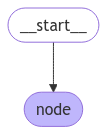
LangGraph 提供了用于可视化图的内置工具。让我们检查我们的图。请参阅可视化您的图 了解可视化的详细信息。
from IPython . display import Image , display display ( Image ( graph . get_graph (). draw_mermaid_png ()))
在这种情况下,我们的图只执行一个节点。让我们继续进行简单的调用:
from langchain . messages import HumanMessage result = graph . invoke ({ "messages" : [ HumanMessage ( "Hi" )]}) result
{'messages': [HumanMessage(content='Hi'), AIMessage(content='Hello!')], 'extra_field': 10}
请注意:
我们通过更新状态的一个键来启动调用。
我们在调用结果中收到整个状态。
为方便起见,我们经常通过漂亮打印来检查消息对象 的内容:
for message in result [ " messages " ]: message . pretty_print ()
================================ Human Message ================================

Hi
================================== Ai Message ==================================

Hello!
使用归约器处理状态更新 状态中的每个键都可以有自己的独立归约器 函数,它控制如何应用来自节点的更新。如果未明确指定归约函数,则假定对该键的所有更新都应该覆盖它。
对于 TypedDict 状态模式,我们可以通过用归约函数注解状态的相应字段来定义归约器。
在之前的示例中,我们的节点通过将消息追加到消息列表来更新状态中的 "messages" 键。下面,我们为此键添加一个归约器,以便更新自动追加:
from typing_extensions import Annotated def add ( left , right ): """也可以从 `operator` 内置模块导入 `add`""" return left + right class State ( TypedDict ): messages : Annotated [ list [ AnyMessage ], add ] extra_field : int
现在我们的节点可以简化:
def node ( state : State ): new_message = AIMessage ( "Hello!" ) return { "messages" : [ new_message ], "extra_field" : 10 }
from langgraph . graph import START graph = StateGraph ( State ). add_node ( node ). add_edge ( START , "node" ). compile () result = graph . invoke ({ "messages" : [ HumanMessage ( "Hi" )]}) for message in result [ " messages " ]: message . pretty_print ()
================================ Human Message ================================

Hi
================================== Ai Message ==================================

Hello!
MessagesState 在实践中,更新消息列表时需要考虑其他因素:
LangGraph 包含一个内置的归约器 add_messages
from langgraph . graph . message import add_messages class State ( TypedDict ): messages : Annotated [ list [ AnyMessage ], add_messages ] extra_field : int def node ( state : State ): new_message = AIMessage ( "Hello!" ) return { "messages" : [ new_message ], "extra_field" : 10 } graph = StateGraph ( State ). add_node ( node ). set_entry_point ( "node" ). compile ()
input_message = { "role" : "user" , "content" : "Hi" } result = graph . invoke ({ "messages" : [ input_message ]}) for message in result [ " messages " ]: message . pretty_print ()
================================ Human Message ================================

Hi
================================== Ai Message ==================================

Hello!
这是涉及聊天模型 的应用程序的状态的通用表示。LangGraph 包含一个预构建的 MessagesState 以方便使用,因此我们可以拥有:
from langgraph . graph import MessagesState class State ( MessagesState ): extra_field : int
使用 Overwrite 绕过归约器 在某些情况下,您可能希望绕过归约器并直接覆盖状态值。LangGraph 为此提供了 OverwriteOverwrite 包装的值时,归约器被绕过,通道直接设置为该值。
当您想要重置或替换累积的状态而不是将其与现有值合并时,这很有用。
from langgraph . graph import StateGraph , START , END from langgraph . types import Overwrite from typing_extensions import Annotated , TypedDict import operator class State ( TypedDict ): messages : Annotated [ list , operator . add ] def add_message ( state : State ): return { "messages" : [ "first message" ]} def replace_messages ( state : State ): # 绕过归约器并替换整个消息列表 return { "messages" : Overwrite ([ "replacement message" ])} builder = StateGraph ( State ) builder . add_node ( "add_message" , add_message ) builder . add_node ( "replace_messages" , replace_messages ) builder . add_edge ( START , "add_message" ) builder . add_edge ( "add_message" , "replace_messages" ) builder . add_edge ( "replace_messages" , END ) graph = builder . compile () result = graph . invoke ({ "messages" : [ "initial" ]}) print ( result [ " messages " ])
['initial', 'first message', 'replacement message']
您还可以使用带有特殊键 "__overwrite__" 的 JSON 格式:
def replace_messages ( state : State ): return { "messages" : { "__overwrite__" : [ "replacement message" ]}}
当节点并行执行时,在给定的超步骤中,只有一个节点可以在同一状态键上使用 Overwrite。如果多个节点在同一超步骤中尝试覆盖同一键,将引发 InvalidUpdateError。
定义输入和输出模式 默认情况下,StateGraph 使用单一模式运行,所有节点都预期使用该模式进行通信。但是,也可以为图定义不同的输入和输出模式。
当指定不同的模式时,节点之间仍将使用内部模式进行通信。输入模式确保提供的输入与预期结构匹配,而输出模式根据定义的输出模式过滤内部数据,仅返回相关信息。
下面,我们将看到如何定义不同的输入和输出模式。
from langgraph . graph import StateGraph , START , END from typing_extensions import TypedDict # 定义输入的模式 class InputState ( TypedDict ): question : str # 定义输出的模式 class OutputState ( TypedDict ): answer : str # 定义整体模式,结合输入和输出 class OverallState ( InputState , OutputState ): pass # 定义处理输入并生成答案的节点 def answer_node ( state : InputState ): # 示例答案和一个额外的键 return { "answer" : "bye" , "question" : state [ " question " ]} # 使用指定的输入和输出模式构建图 builder = StateGraph ( OverallState , input_schema = InputState , output_schema = OutputState ) builder . add_node ( answer_node ) # 添加答案节点 builder . add_edge ( START , "answer_node" ) # 定义起始边 builder . add_edge ( "answer_node" , END ) # 定义结束边 graph = builder . compile () # 编译图 # 使用输入调用图并打印结果 print ( graph . invoke ({ "question" : "hi" }))
请注意,调用的输出仅包括输出模式。
在节点之间传递私有状态 在某些情况下,您可能希望节点交换对中间逻辑至关重要但不需要成为图主要模式一部分的信息。此私有数据与图的总体输入/输出无关,仅应在某些节点之间共享。
下面,我们将创建一个示例序列图,由三个节点(node_1、node_2 和 node_3)组成,其中私有数据在前两个步骤(node_1 和 node_2)之间传递,而第三个步骤(node_3)只能访问公共整体状态。
from langgraph . graph import StateGraph , START , END from typing_extensions import TypedDict # 图的整体状态(这是在节点之间共享的公共状态) class OverallState ( TypedDict ): a : str # node_1 的输出包含不属于整体状态的私有数据 class Node1Output ( TypedDict ): private_data : str # 私有数据仅在 node_1 和 node_2 之间共享 def node_1 ( state : OverallState ) -> Node1Output : output = { "private_data" : "set by node_1" } print ( f "Entered node `node_1`: \n\t Input: { state } . \n\t Returned: { output } " ) return output # Node 2 输入仅请求 node_1 之后可用的私有数据 class Node2Input ( TypedDict ): private_data : str def node_2 ( state : Node2Input ) -> OverallState : output = { "a" : "set by node_2" } print ( f "Entered node `node_2`: \n\t Input: { state } . \n\t Returned: { output } " ) return output # Node 3 只能访问整体状态(无法访问来自 node_1 的私有数据) def node_3 ( state : OverallState ) -> OverallState : output = { "a" : "set by node_3" } print ( f "Entered node `node_3`: \n\t Input: { state } . \n\t Returned: { output } " ) return output # 按序列连接节点 # node_2 接受来自 node_1 的私有数据,而 # node_3 看不到私有数据。 builder = StateGraph ( OverallState ). add_sequence ([ node_1 , node_2 , node_3 ]) builder . add_edge ( START , "node_1" ) graph = builder . compile () # 使用初始状态调用图 response = graph . invoke ( { "a" : "set at start" , } ) print () print ( f "Output of graph invocation: { response } " )
Entered node `node_1`:
    Input: {'a': 'set at start'}.
    Returned: {'private_data': 'set by node_1'}
Entered node `node_2`:
    Input: {'private_data': 'set by node_1'}.
    Returned: {'a': 'set by node_2'}
Entered node `node_3`:
    Input: {'a': 'set by node_2'}.
    Returned: {'a': 'set by node_3'}

Output of graph invocation: {'a': 'set by node_3'}
使用 Pydantic 模型作为图状态 StateGraph 在初始化时接受一个 state_schema在我们的示例中,我们通常使用 Python 原生的 TypedDict 或 dataclassstate_schema,但 state_schema类型 。
在这里,我们将看到如何使用 Pydantic BaseModel 作为 state_schema输入 添加运行时验证。
已知限制
目前,图的输出不会 是 pydantic 模型的实例。
运行时验证仅对图中第一个节点的输入发生,不对后续节点或输出发生。
来自 pydantic 的验证错误跟踪不显示错误在哪个节点中产生。
Pydantic 的递归验证可能很慢。对于性能敏感的应用程序,您可能需要考虑使用 dataclass 代替。
from langgraph . graph import StateGraph , START , END from typing_extensions import TypedDict from pydantic import BaseModel # 图的整体状态(这是在节点之间共享的公共状态) class OverallState ( BaseModel ): a : str def node ( state : OverallState ): return { "a" : "goodbye" } # 构建状态图 builder = StateGraph ( OverallState ) builder . add_node ( node ) # node_1 是第一个节点 builder . add_edge ( START , "node" ) # 使用 node_1 启动图 builder . add_edge ( "node" , END ) # 在 node_1 之后结束图 graph = builder . compile () # 使用有效输入测试图 graph . invoke ({ "a" : "hello" })
使用无效 输入调用图
try : graph . invoke ({ "a" : 123 }) # 应该是字符串 except Exception as e : print ( "An exception was raised because `a` is an integer rather than a string." ) print ( e )
An exception was raised because `a` is an integer rather than a string.
1 validation error for OverallState
a
  Input should be a valid string [type=string_type, input_value=123, input_type=int]
    For further information visit https://errors.pydantic.dev/2.9/v/string_type
请参阅下方了解 Pydantic 模型状态的其他功能:
当使用 Pydantic 模型作为状态模式时,了解序列化如何工作很重要,特别是当:
将 Pydantic 对象作为输入传递
从图接收输出
处理嵌套的 Pydantic 模型
让我们看看这些行为的实际应用。 from langgraph . graph import StateGraph , START , END from pydantic import BaseModel class NestedModel ( BaseModel ): value : str class ComplexState ( BaseModel ): text : str count : int nested : NestedModel def process_node ( state : ComplexState ): # 节点接收一个经过验证的 Pydantic 对象 print ( f "Input state type: { type ( state ) } " ) print ( f "Nested type: { type ( state . nested ) } " ) # 返回字典更新 return { "text" : state . text + " processed" , "count" : state . count + 1 } # 构建图 builder = StateGraph ( ComplexState ) builder . add_node ( "process" , process_node ) builder . add_edge ( START , "process" ) builder . add_edge ( "process" , END ) graph = builder . compile () # 为输入创建一个 Pydantic 实例 input_state = ComplexState ( text = "hello" , count = 0 , nested = NestedModel ( value = "test" )) print ( f "Input object type: { type ( input_state ) } " ) # 使用 Pydantic 实例调用图 result = graph . invoke ( input_state ) print ( f "Output type: { type ( result ) } " ) print ( f "Output content: { result } " ) # 如果需要,转换回 Pydantic 模型 output_model = ComplexState ( ** result ) print ( f "Converted back to Pydantic: { type ( output_model ) } " )
Pydantic 对某些数据类型执行运行时类型强制转换。这可能很有用,但如果您不知道这一点,也可能导致意外行为。 from langgraph . graph import StateGraph , START , END from pydantic import BaseModel class CoercionExample ( BaseModel ): # Pydantic 将把字符串数字强制转换为整数 number : int # Pydantic 将把字符串布尔值解析为 bool flag : bool def inspect_node ( state : CoercionExample ): print ( f "number: { state . number } (type: { type ( state . number ) } )" ) print ( f "flag: { state . flag } (type: { type ( state . flag ) } )" ) return {} builder = StateGraph ( CoercionExample ) builder . add_node ( "inspect" , inspect_node ) builder . add_edge ( START , "inspect" ) builder . add_edge ( "inspect" , END ) graph = builder . compile () # 使用将被转换的字符串输入演示强制转换 result = graph . invoke ({ "number" : "42" , "flag" : "true" }) # 这将因验证错误而失败 try : graph . invoke ({ "number" : "not-a-number" , "flag" : "true" }) except Exception as e : print ( f " \n Expected validation error: { e } " )
当在状态模式中使用 LangChain 消息类型时,序列化有一些重要的考虑因素。对于通过线路传输的消息对象,您应该使用 AnyMessage(而不是 BaseMessage)以实现正确的序列化/反序列化。 from langgraph . graph import StateGraph , START , END from pydantic import BaseModel from langchain . messages import HumanMessage , AIMessage , AnyMessage from typing import List class ChatState ( BaseModel ): messages : List [ AnyMessage ] context : str def add_message ( state : ChatState ): return { "messages" : state . messages + [ AIMessage ( content = "Hello there!" )]} builder = StateGraph ( ChatState ) builder . add_node ( "add_message" , add_message ) builder . add_edge ( START , "add_message" ) builder . add_edge ( "add_message" , END ) graph = builder . compile () # 创建带有消息的输入 initial_state = ChatState ( messages = [ HumanMessage ( content = "Hi" )], context = "Customer support chat" ) result = graph . invoke ( initial_state ) print ( f "Output: { result } " ) # 转换回 Pydantic 模型以查看消息类型 output_model = ChatState ( ** result ) for i , msg in enumerate ( output_model . messages ): print ( f "Message { i } : { type ( msg ). __name__ } - { msg . content } " )
添加运行时配置 有时您希望能够在调用图时配置图。例如,您可能希望能够在运行时指定使用什么 LLM 或系统提示,而_不在图中污染图状态_。
要添加运行时配置:
为您的配置指定一个模式
将配置添加到节点或条件边的函数签名中
将配置传递到图中。
请参阅下面的简单示例:
from langgraph . graph import END , StateGraph , START from langgraph . runtime import Runtime from typing_extensions import TypedDict # 1. 指定配置模式 class ContextSchema ( TypedDict ): my_runtime_value : str # 2. 定义一个在节点中访问配置的图 class State ( TypedDict ): my_state_value : str def node ( state : State , runtime : Runtime [ ContextSchema ]): if runtime . context [ " my_runtime_value " ] == "a" : return { "my_state_value" : 1 } elif runtime . context [ " my_runtime_value " ] == "b" : return { "my_state_value" : 2 } else : raise ValueError ( "Unknown values." ) builder = StateGraph ( State , context_schema = ContextSchema ) builder . add_node ( node ) builder . add_edge ( START , "node" ) builder . add_edge ( "node" , END ) graph = builder . compile () # 3. 在运行时传入配置: print ( graph . invoke ({}, context = { "my_runtime_value" : "a" })) print ( graph . invoke ({}, context = { "my_runtime_value" : "b" }))
{'my_state_value': 1}
{'my_state_value': 2}
下面我们演示一个实际示例,在其中我们配置在运行时使用什么 LLM。我们将使用 OpenAI 和 Anthropic 模型。 from dataclasses import dataclass from langchain . chat_models import init_chat_model from langgraph . graph import MessagesState , END , StateGraph , START from langgraph . runtime import Runtime from typing_extensions import TypedDict @dataclass class ContextSchema : model_provider : str = "anthropic" MODELS = { "anthropic" : init_chat_model ( "claude-haiku-4-5-20251001" ), "openai" : init_chat_model ( "gpt-4.1-mini" ), } def call_model ( state : MessagesState , runtime : Runtime [ ContextSchema ]): model = MODELS [ runtime . context . model_provider ] response = model . invoke ( state [ " messages " ]) return { "messages" : [ response ]} builder = StateGraph ( MessagesState , context_schema = ContextSchema ) builder . add_node ( "model" , call_model ) builder . add_edge ( START , "model" ) builder . add_edge ( "model" , END ) graph = builder . compile () # 用法 input_message = { "role" : "user" , "content" : "hi" } # 没有配置,使用默认值 response_1 = graph . invoke ({ "messages" : [ input_message ]}, context = ContextSchema ())[ "messages" ][ - 1 ] # 或者,可以设置 OpenAI response_2 = graph . invoke ({ "messages" : [ input_message ]}, context = { "model_provider" : "openai" })[ "messages" ][ - 1 ] print ( response_1 . response_metadata [ " model_name " ]) print ( response_2 . response_metadata [ " model_name " ])
claude-haiku-4-5-20251001
gpt-4.1-mini-2025-04-14
下面我们演示一个实际示例,在其中我们配置两个参数:在运行时使用的 LLM 和系统消息。 from dataclasses import dataclass from langchain . chat_models import init_chat_model from langchain . messages import SystemMessage from langgraph . graph import END , MessagesState , StateGraph , START from langgraph . runtime import Runtime from typing_extensions import TypedDict @dataclass class ContextSchema : model_provider : str = "anthropic" system_message : str | None = None MODELS = { "anthropic" : init_chat_model ( "claude-haiku-4-5-20251001" ), "openai" : init_chat_model ( "gpt-4.1-mini" ), } def call_model ( state : MessagesState , runtime : Runtime [ ContextSchema ]): model = MODELS [ runtime . context . model_provider ] messages = state [ " messages " ] if ( system_message := runtime . context . system_message ): messages = [ SystemMessage ( system_message )] + messages response = model . invoke ( messages ) return { "messages" : [ response ]} builder = StateGraph ( MessagesState , context_schema = ContextSchema ) builder . add_node ( "model" , call_model ) builder . add_edge ( START , "model" ) builder . add_edge ( "model" , END ) graph = builder . compile () # 用法 input_message = { "role" : "user" , "content" : "hi" } response = graph . invoke ({ "messages" : [ input_message ]}, context = { "model_provider" : "openai" , "system_message" : "Respond in Italian." }) for message in response [ " messages " ]: message . pretty_print ()
================================ Human Message ================================

hi
================================== Ai Message ==================================

Ciao! Come posso aiutarti oggi?
添加重试策略 在许多用例中,您可能希望节点具有自定义重试策略,例如,如果您正在调用 API、查询数据库或调用 LLM 等。LangGraph 允许您向节点添加重试策略。
要配置重试策略,请将 retry_policy 参数传递给 add_noderetry_policy 参数接受一个 RetryPolicy 命名元组对象。下面我们使用默认参数实例化一个 RetryPolicy 对象,并将其与节点关联:
from langgraph . types import RetryPolicy builder . add_node ( "node_name" , node_function , retry_policy = RetryPolicy (), )
默认情况下,retry_on 参数使用 default_retry_on 函数,该函数会重试除以下异常外的所有异常:
ValueErrorTypeErrorArithmeticErrorImportErrorLookupErrorNameErrorSyntaxErrorRuntimeErrorReferenceErrorStopIterationStopAsyncIterationOSError
此外,对于来自流行的 http 请求库(如 requests 和 httpx)的异常,它仅重试 5xx 状态码。
在节点内部访问执行信息 您可以通过 runtime.execution_info 访问执行标识和重试信息。这会公开线程、运行和检查点标识符以及重试状态,而无需直接从 config 读取。
属性 类型 描述 thread_idstr | None当前执行的线程 ID。如果没有检查点,则为 None。 run_idstr | None当前执行的运行 ID。当配置中未提供时为 None。 checkpoint_idstr当前执行的检查点 ID。 checkpoint_nsstr当前执行的检查点命名空间。 task_idstr当前执行的任务 ID。 node_attemptint当前执行尝试次数(从 1 开始索引)。第一次尝试为 1,第一次重试为 2,以此类推。 node_first_attempt_timefloat | None第一次尝试开始的 Unix 时间戳(秒)。在重试之间保持不变。
访问线程和运行 ID 使用 execution_info 在节点内部访问线程 ID、运行 ID 和其他标识字段:
from langgraph . graph import StateGraph , START , END from langgraph . runtime import Runtime from typing_extensions import TypedDict class State ( TypedDict ): result : str def my_node ( state : State , runtime : Runtime ): info = runtime . execution_info print ( f "Thread: { info . thread_id } , Run: { info . run_id } " ) return { "result" : "done" } builder = StateGraph ( State ) builder . add_node ( "my_node" , my_node ) builder . add_edge ( START , "my_node" ) builder . add_edge ( "my_node" , END ) graph = builder . compile ()
根据重试状态调整行为 

 在这种情况下,我们的图只执行一个节点。让我们继续进行简单的调用: